G-Sync and FPS Games

Talk about NVIDIA G-SYNC, a variable refresh rate (VRR) technology. G-SYNC eliminates stutters, tearing, and reduces input lag. List of G-SYNC Monitors.
Interceptor
Posts: 5
Joined: 12 Jan 2014, 13:45

G-Sync and FPS Games

Post by Interceptor » 12 Jan 2014, 21:20

Hi
(sorry for my English)
I'm looking forward for G-Sync mostly in FPS games. So far "demos" with g-sync in action was with non-intense videos or games (LoL/Starcraft?)
before buying it (atm it's overpriced, waiting till price drop to around 100$) want to know that it will give me the same comfort as i play right now.
I'm playing Battlefield 4 atm most of the time. With Asus VG248QE@144Hz (i play without lightboost) and v-sync off, FPS around 100-300+ and its just great, of course i play with settings set to custom (mostly low, filtering,mesh and textures set to high) to handle high fps.
Could someone with g-sync and battlefield 4 check is game smooth at 60,120,144 vs 144++ without g-sync.
I'm using MSI Afterburner to monitor whats is going on when i play,
I turned on frametime to show in OSD in-game. I'm not sure is it affect game smooth
Image 60FPS 16ms Frametime i feel like play with slow-mo
Image 120FPS ~8ms way better than 60fps
Image ~300FPS ~4ms hard to feel difference between 120 and ~300FPS.
how it might be with G-sync on @60-144fps (then i could turn on details to ultra and still have the same smooth as @120+FPS)

Right now whenever fps drops under 100 i can feel it.

User avatar
Chief Blur Buster
Site Admin
Posts: 12272
Joined: 05 Dec 2013, 15:44
Location: Toronto / Hamilton, Ontario, Canada
Contact:

Re: G-Sync and FPS Games

Post by Chief Blur Buster » 12 Jan 2014, 22:14

Interceptor wrote:I'm playing Battlefield 4 atm most of the time. With Asus VG248QE@144Hz (i play without lightboost) and v-sync off, FPS around 100-300+ and its just great, of course i play with settings set to custom (mostly low, filtering,mesh and textures set to high) to handle high fps.
Getting Battlefield 4 to run at high framerates (100-300fps) is quite impressive, and I must ask a question about how you're managing to get Battlefield 4 to run at 300 frames per second. Are you using a multiple-GPU setup, or are you reducing detail levels massively? I noticed from your screenshots, that you probably turned off shadows, which probably helps your frame rate massively.
Interceptor wrote:Hihow it might be with G-sync on @60-144fps (then i could turn on details to ultra and still have the same smooth as @120+FPS)
Right now whenever fps drops under 100 i can feel it.

I'm about to publish my GSYNC review Part #2 before I go to bed tonight, and it actually covers some of this subject.

I can, however, confirm, via my high speed camera tests, there's virtually no latency difference between VSYNC OFF and GSYNC. Test results are within ~2ms of each other.

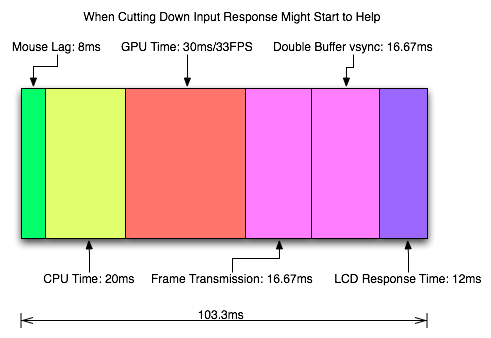
Whole chain latency (button-to-photons) in Battlefield 4 is quite high, from button-to-photons, often exceeding 60 milliseconds. That includes game logic, frame buffering, micropacket transmission over DisplayPort, and visible pixel transition. I have soldered a LED indicator to the internals of my Logitech G9x, and pointed a 1000fps camera at both the mouse & the screen, measuring the number of milliseconds between button press and illumination on the screen. It is known that the whole-chain input latency is quite complicated, as known from AnandTech's Exploring Input Lag Inside & Out
Image ...versus... Image
So check again in less than 24 hours, and you'll see GSYNC Part #2, with these input lag tests!
Head of Blur Busters - BlurBusters.com | TestUFO.com | Follow @BlurBusters on: BlueSky | Twitter | Facebook

Image
Forum Rules wrote:  1. Rule #1: Be Nice. This is published forum rule #1. Even To Newbies & People You Disagree With!
  2. Please report rule violations If you see a post that violates forum rules, then report the post.
  3. ALWAYS respect indie testers here. See how indies are bootstrapping Blur Busters research!

Interceptor
Posts: 5
Joined: 12 Jan 2014, 13:45

Re: G-Sync and FPS Games

Post by Interceptor » 12 Jan 2014, 23:18

thx for reply
im using single gpu [email protected][email protected]
of course im not saying about constant 300fps(probably 100-150). and yes most settings are set to low to keep fps over 100 (FHD)
gonna wait for GSYNC part 2! than.
Cheers!

User avatar
sharknice
Posts: 295
Joined: 23 Dec 2013, 17:16
Location: Minnesota
Contact:

Re: G-Sync and FPS Games

Post by sharknice » 13 Jan 2014, 00:45

I'm running SLI 770s and a 4770k OC'd to 4.5Ghz and I have most of my settings on low but I have lighting and filtering on medium.

I rarely dip below 120 and sometimes I get in the 300s too. On the test range I get a pretty consistent 200 FPS.

User avatar
nimbulan
Posts: 323
Joined: 29 Dec 2013, 23:32
Location: Oregon

Re: G-Sync and FPS Games

Post by nimbulan » 13 Jan 2014, 15:04

Battlefield 4 is high on my list of games to test once I get my G-sync kit. I only have a GTX 760 but I'll see what sort of framerates I can achieve for testing. I've been getting ~45-90 on high-ultra settings which is perfect for G-sync testing but I'll see what I can get on low.

Interceptor
Posts: 5
Joined: 12 Jan 2014, 13:45

Re: G-Sync and FPS Games

Post by Interceptor » 13 Jan 2014, 18:45

if u could test low settings with 100++fps vs ultra at 50-90fps.
right now when i play at 100+fps and when it drops under 100 it's noticeable to feel lower smooth of gameplay.

User avatar
Chief Blur Buster
Site Admin
Posts: 12272
Joined: 05 Dec 2013, 15:44
Location: Toronto / Hamilton, Ontario, Canada
Contact:

Re: G-Sync and FPS Games

Post by Chief Blur Buster » 13 Jan 2014, 18:51

Go check it out now.

G-SYNC Preview, Part #2

Covers two big topics:
- Actual input lag measurements of G-SYNC!
- ULMB (Ultra Low Motion Blur).
Head of Blur Busters - BlurBusters.com | TestUFO.com | Follow @BlurBusters on: BlueSky | Twitter | Facebook

Image
Forum Rules wrote:  1. Rule #1: Be Nice. This is published forum rule #1. Even To Newbies & People You Disagree With!
  2. Please report rule violations If you see a post that violates forum rules, then report the post.
  3. ALWAYS respect indie testers here. See how indies are bootstrapping Blur Busters research!

Interceptor
Posts: 5
Joined: 12 Jan 2014, 13:45

Re: G-Sync and FPS Games

Post by Interceptor » 13 Jan 2014, 19:18

i already read it, and thats what im looking for, v-sync off vs g-sync on with the same fps looks good, but how it will be compared with high fps (settings set to low) 100++ vs g-sync on with ultra details and fps around 60-100
it might be the same as cs:go(300fps v-sync off is equal to 120fps g-sync on) but game engine is different and just wanna be sure :)
anyway great test, looks like huge step made by nvidia for smooth gaming :)

User avatar
Chief Blur Buster
Site Admin
Posts: 12272
Joined: 05 Dec 2013, 15:44
Location: Toronto / Hamilton, Ontario, Canada
Contact:

Re: G-Sync and FPS Games

Post by Chief Blur Buster » 14 Jan 2014, 19:36

Interceptor wrote:i already read it, and thats what im looking for, v-sync off vs g-sync on with the same fps looks good, but how it will be compared with high fps (settings set to low) 100++ vs g-sync on with ultra details and fps around 60-100
it might be the same as cs:go(300fps v-sync off is equal to 120fps g-sync on) but game engine is different and just wanna be sure :)
anyway great test, looks like huge step made by nvidia for smooth gaming :)
I would like to see more latency tests.

Blur Busters is looking for readers/players willing to do this lag testing for blur busters, using my method invention. It simply requires a simple gaming mouse modification and a cheap 150 dollar high speed 1000fps camera. Beginning this year, Blur Busters will pay blog reporters (per article or agreed round of tests) for exclusive article content written for this site. If you have blog writing and game testing experience, send me a pm.
Head of Blur Busters - BlurBusters.com | TestUFO.com | Follow @BlurBusters on: BlueSky | Twitter | Facebook

Image
Forum Rules wrote:  1. Rule #1: Be Nice. This is published forum rule #1. Even To Newbies & People You Disagree With!
  2. Please report rule violations If you see a post that violates forum rules, then report the post.
  3. ALWAYS respect indie testers here. See how indies are bootstrapping Blur Busters research!

dan4real
Posts: 1
Joined: 19 Jan 2014, 17:16

Re: G-Sync and FPS Games

Post by dan4real » 19 Jan 2014, 17:24

Just ordered the upgrade kit, definitely interested in doing some testing with BF4.

Post Reply