Page 1 of 5
EXCLUSIVE: We measure G-SYNC Input Lag in GSYNC Preview #2!
Posted: 13 Jan 2014, 18:18
by Chief Blur Buster
Check it out now.
G-SYNC Preview, Part #2
Covers two big topics:
- Actual input lag measurements of G-SYNC!
- ULMB (Ultra Low Motion Blur).
This article utilizes a creative invention (LED indicator attached to a mouse)
Re: EXCLUSIVE: We measure G-SYNC Input Lag in GSYNC Preview
Posted: 13 Jan 2014, 18:31
by Chief Blur Buster
Essentially a modified computer mouse, that has a LED that is directly connected to the mouse button, and instantly illuminates upon button press (bypassing all computer latencies).
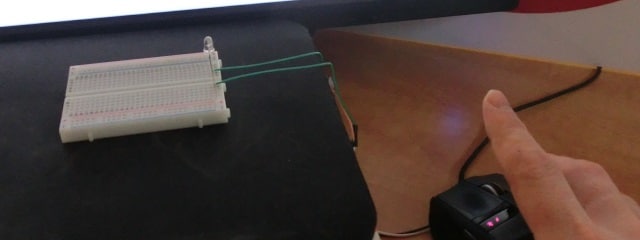
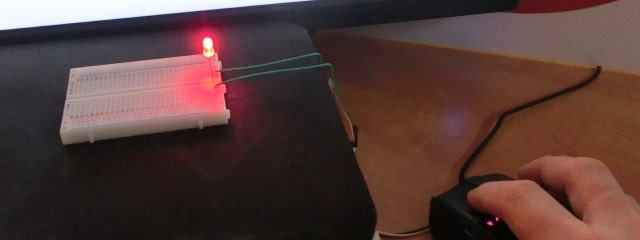
Then the LED is placed in front of the screen.
...A high speed camera (1000fps) is pointed at both the screen and LED simultaneously:
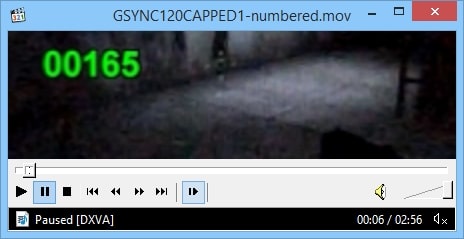
This is an example high speed video frame of a game scene.
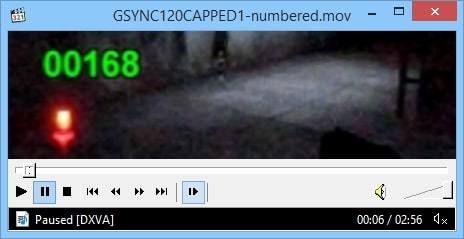
The mouse LED turns on first, as the mouse button is pressed.
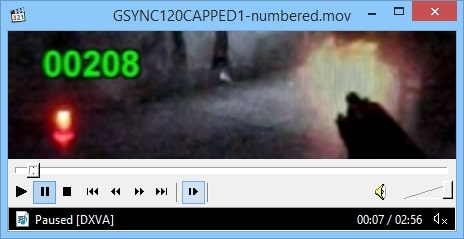
Finally, then the gun reacts several milliseconds later.
With 1000fps video, one frame is one millisecond. Conveniently, one can calculate the difference in frame numbers, between the LED illumination and the first gun reaction (whatever the first on-screen reaction is; such as a crosshairs animation, or gun moving upwards right before muzzle flash). This equals the whole-chain input lag in milliseconds, all the way from mouse button to pixels!
This makes it possible to measure GSYNC input lag, and compare it to other modes such as VSYNC OFF.
Re: EXCLUSIVE: We measure G-SYNC Input Lag in GSYNC Preview
Posted: 13 Jan 2014, 19:05
by sharknice
That input lag testing method is awesome.
btw you can use the left and right arrow keys in media player classic to step individual frames if you don't want to use quicktime.
Re: EXCLUSIVE: We measure G-SYNC Input Lag in GSYNC Preview
Posted: 13 Jan 2014, 19:20
by nimbulan
That is some excellent testing, definitely makes me wish I had a high speed camera. I was a bit surprised to see how large the difference in input lag is with CSGO. The total frame time is only 6.9ms at 144Hz so the engine must be buffering several frames to generate such a large increase in latency. Did you try adjusting the maximum pre-rendered frames in the nVidia control panel to see if that had any effect?
Re: EXCLUSIVE: We measure G-SYNC Input Lag in GSYNC Preview
Posted: 13 Jan 2014, 20:09
by Karnaj
Hm, so ULMB lacks the strobe length setting... Well that's a downer.

You mentioned the brightness is the same as LightBoost=100%, so ULMB 100 Hz would result in 2.8 ms (3~ pixels) of motion blur according to
this page? Do you think that adding a strobe length setting would be possible through a Nvidia driver (or software) update or would we need to wait for an updated G-Sync module?
Great findings regarding the G-Sync input lag during capped frame rates! I really hope that more developers implement an fps_max command.
Re: EXCLUSIVE: We measure G-SYNC Input Lag in GSYNC Preview
Posted: 13 Jan 2014, 20:30
by Chief Blur Buster
Strobe length measurements will come in a future article (sometime after other monitor reviews are posted). But it currently most resembles about 2ms.
Don't confuse LightBoost 100Hz 100% (2.8ms) with LightBoost 120Hz 100% (2.4ms), as strobe lengths shorten/lengthens proportionally relative to refresh rate, to maintain the same amount of motion blur reduction.
Re: EXCLUSIVE: We measure G-SYNC Input Lag in GSYNC Preview
Posted: 14 Jan 2014, 00:05
by ericl
Great review! I really learned a lot of love the tests you've done for input lag!
Now for a Lightboost at 144hz vs ULMB at 120hz comparison

Re: EXCLUSIVE: We measure G-SYNC Input Lag in GSYNC Preview
Posted: 14 Jan 2014, 01:15
by Haruspex
Very interesting article Mark! I'm guessing that ULMB enabled at 85hz/85fps would have less motion blur than 120hz/120fps with no strobe of any kind enabled, no?
Re: EXCLUSIVE: We measure G-SYNC Input Lag in GSYNC Preview
Posted: 14 Jan 2014, 01:19
by Karnaj
ericl wrote:Great review! I really learned a lot of love the tests you've done for input lag!
Now for a Lightboost at 144hz vs ULMB at 120hz comparison
LightBoost is limited between 100 to 120 Hz.

Re: EXCLUSIVE: We measure G-SYNC Input Lag in GSYNC Preview
Posted: 14 Jan 2014, 05:54
by Q83Ia7ta
Very nice method. Great job!
Did you try adjusting the maximum pre-rendered frames in the nVidia control panel to see if that had any effect?