Strobe Utility crashing as soon as I open it

Adjusting BENQ Blur Reduction and DyAc (Dynamic Acceleration) including Blur Busters Strobe Utility. Supports most BenQ/Zowie Z-Series monitors (XL2411, XL2420, XL2720, XL2735, XL2540, XL2546)
acidaus
Posts: 1
Joined: 02 Apr 2015, 03:48

Strobe Utility crashing as soon as I open it

Post by acidaus » 02 Apr 2015, 03:52

Chief Blur Buster wrote:UPDATE APRIL 29th, 2017: FIXED!
New Zowie-Compatible Strobe Utility Here
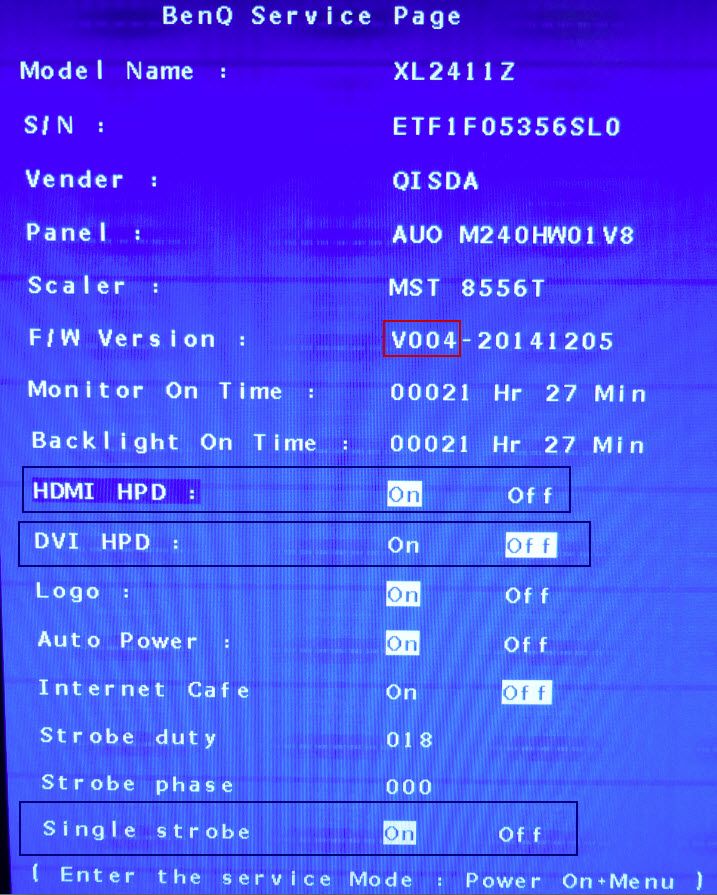
Hey there, I just got my XL2411Z it's connected with DVI and is using V004 firmware.

I used the settings recommended online but when I put on blur reduction it goes way too dark.

I am trying to use Strobe utility but as soon as I open it it crashes before it even initialises... just says the program has stopped working.

I'm using AMD Catalyst 14.501 ...

I have a second monitor, a Samsung, connected via HDMI .

Any idea what's causing the strobe utility to crash?

User avatar
masterotaku
Posts: 437
Joined: 20 Dec 2013, 04:01

Re: Strobe Utility crashing as soon as I open it

Post by masterotaku » 02 Apr 2015, 04:14

I don't know why it's crashing, but you can do the same (and more) tweaks in the service menu of the monitor. While the monitor is off, hold the 2nd button from the left, press the power button and then release the button you were holding. After the monitor is on, the 4th button will open/close the service menu. There you can change strobe duty and strobe phase.

By the way, we need someone to dump the XL2411Z V4 firmware. It isn't anywhere to download. It can be done with linux. Falkentyne told me this:

"I dumped my V2 (into a 2 mb file) with this command

# dump current firmware
sudo ./flashrom -p mstarddc_spi:dev=/dev/i2c-1:49 -c "MX25L1605A/MX25L1606E" -r backup.bin

The backup V2 was 2 mb, even though the raw firmware file is smaller".

That was with his XL2720Z. It can be different with your monitor.
CPU: Intel Core i7 7700K @ 4.9GHz
GPU: Gainward Phoenix 1080 GLH
RAM: GSkill Ripjaws Z 3866MHz CL19
Motherboard: Gigabyte Gaming M5 Z270
Monitor: Asus PG278QR

Falkentyne
Posts: 2805
Joined: 26 Mar 2014, 07:23

Re: Strobe Utility crashing as soon as I open it

Post by Falkentyne » 02 Apr 2015, 05:05

Yeah we *REALLY* need someone with a V4 firmware to dump it for us.

THERE IS ABSOLUTELY NO RISK IN DUMPING THE FIRMWARE. zero. NADA.
But you will need a Ubuntu boot disk.

However, you do need a few things.
1) A relatively recent laptop with an integrated network adapter/wifi and a VGA port (this works best and is virtually foolproof). It MAY be possible to use an old Pentium computer with a VGA port, however I do NOT know how Ubuntu can access or even utilize old network adapters. Attempting to use DVI may or may not work.
It *MAY* be possible to use a VGA through a DVI port with a VGA to DVI Adapter and a VGA cable.
2) a computer that can expose its i2c bus. If you have an old Pentium *THAT CAN BOOT WITH A USB BOOT OPTION*, then you should be ok. Again a laptop works best. I can not help if you try this on a desktop.

I did test booting to Ubuntu directly on my desktop with the integrated realtek wired Nic, and it worked and Ubuntu was able to download packages successfully. I was connected to DVI so I did not bother testing the i2c stuff. If you do not have a VGA port available and want to still try through DVI and usb booting through your desktop, that's your choice. Just make sure you have the instructions written somewhere.

First grab a USB flash drive. 8 GB+ works best, though I did use an empty 2 GB one.
Get the ISO for Linux (Ubuntu)
http://releases.ubuntu.com/14.04/
I used the i386 one for my core i7.

Download the easy to use USB installer here:
"http://www.pendrivelinux.com/universal- ... -as-1-2-3/"

Install it then boot to the flash drive and run the try Ubuntu mode.
When it finishes loading, open a terminal (Ctrl + Alt + T);
type "sudo gedit /etc/apt/sources.list" without the quotes to bring up the editor.
At the end of the second line, add "Universe Multiverse" so the line looks exactly iike this:

"deb http://archive.ubuntu.com/ubuntu/ trusty main restricted universe multiverse"
Save and exit the sources.list file.

Then type "sudo apt-get update"
That should download some updates.
Then type:
sudo apt-get install i2c-tools subversion libpci-dev
That should update and install some package lists.

You MIGHT also need this command too.
sudo apt-get install libusb-dev

If everything installs correctly, great.
But now things get tricky.

Using the instructions on this website, you need to find and backup the V4 firmware. The hard part is actually finding the i2c bus where it's located.

"http://boeglin.org/blog/index.php?entry ... -free(dom)"

Type these commands: Remove any quotes I put, though, including the quotes in the wget command (trying to bypass link creation).

"svn co svn://flashrom.org/flashrom/trunk@1846 flashrom"
"cd flashrom"
wget -O- "http://boeglin.org/static/benq/0001-Add ... ocol.patch | patch -p1" (<---the | is the shifted \ key, aka the "Pipe" symbol). On this website, that link shows up truncated with "...." unless you mouse over it. The full link without truncation is on the main site: "http://boeglin.org/blog/index.php?entry ... -free(dom)"
Remove the quote before http and after -p1.

make -j (<-this should make the flashrom patcher with the data for the mstar scaler)

sudo modprobe i2c-dev

sudo i2cdetect -l <--this lists all i2c buses

sudo i2cdetect 1 <---this lists al i2c buses on bus 1.

sudo i2cdump -r 0-127 1 0x50 <--- get EDID (0x50) from bus 1. You are looking for an EDID dump that shows the monitor name in it. You may have to change the 1 to a 0 ( 0 0x50 insteada of 1 0x50), or you may have to change 0x50 to 0x49. Once you find the dump that says "XL2411Z" then you're good to go. In some cases your monitor may be on bus 0, thus the change from a 1 to a 0.

sudo ./flashrom -p mstarddc_spi:dev=/dev/i2c-1:49 <----# identify flash chip, on bus 1 (/dev/i2c-1) at address 0x49. Change the 1 to a 0 if you are on bus 0.

(dump current firmware)
sudo ./flashrom -p mstarddc_spi:dev=/dev/i2c-1:49 -c "MX25L1605A/MX25L1606E" -r backup.bin <--again change the 1 to a 0 if you are on bus 0.

This should take about 5 minutes to dump. Once that's done, copy backup.bin to a folder on the local hard drive (NOT the USB drive) so you can can upload it somewhere. The dumped file should be 2 mb in size. We can easily verify if you dumped the right thing by a hex editor.


error-id10t
Posts: 36
Joined: 18 Jun 2014, 21:17

Re: Strobe Utility crashing as soon as I open it

Post by error-id10t » 02 Apr 2015, 17:59

PLEASE dump the firmware for us.

You can do it on basically anything as long as it's connected to iGPU, no need for extra laptops etc. Assume you're using DVI so just connect that to your iGPU and run from there, then follow those few steps. Looks daunting but it's easy as it's just commands.
4790K (Broke)
G3258 (@ x48, little beast)
970 G1 Gaming SLI (returned, lacking vRAM for some reason..)
iGPU (waiting for AMD to deliver something nice)
XL2411Z (firmware V4 thanks to people here)

User avatar
Chief Blur Buster
Site Admin
Posts: 12122
Joined: 05 Dec 2013, 15:44
Location: Toronto / Hamilton, Ontario, Canada
Contact:

Re: Strobe Utility crashing as soon as I open it

Post by Chief Blur Buster » 02 Apr 2015, 21:37

acidaus wrote:I am trying to use Strobe utility but as soon as I open it it crashes before it even initialises... just says the program has stopped working.
Try running it in Administrator Mode.
Head of Blur Busters - BlurBusters.com | TestUFO.com | Follow @BlurBusters on: BlueSky | Twitter | Facebook

Image
Forum Rules wrote:  1. Rule #1: Be Nice. This is published forum rule #1. Even To Newbies & People You Disagree With!
  2. Please report rule violations If you see a post that violates forum rules, then report the post.
  3. ALWAYS respect indie testers here. See how indies are bootstrapping Blur Busters research!

whitestar
Posts: 115
Joined: 12 May 2014, 06:11

Re: Strobe Utility crashing as soon as I open it

Post by whitestar » 05 Apr 2015, 13:06

Hi, I just got this monitor myself, and to my surprise it also seems to be using the V4 firmware :):
Image.

I'd like to help you guys get the firmware. However, I'm trying to wrap my brain around those instructions. In a nutshell, is it like this:
1. Connect a laptop to the XL2411Z.
2. Install Ubuntu to a USB stick and boot the laptop with it.
3. Dump the fw onto a USB stick using commands in the terminal.

Is that the essence of it? I don't really understand what an i2c bus is though, and I only have a pretty old laptop (at least 6 years).
I might need a fair bit of handholding to get this done. :)

About BBR on my monitor:
To my eyes it looks really good. When I use Mark's Strobe Utility I use earliest strobe phase (leftmost position) and persistence at 3 or 3.5 when gaming. This puts the crosstalk at about the top 1/5 or 1/6 of the screen when using VT 1500. Which is best I think, as in most games you are on the ground and need the ground to be as ghost/crosstalk free as possible. The crosstalk then happens often in the sky and is not really noticeable.

Now, it IS possible to get an almost perfect screen with just a tiny bit of crosstalk at the bottom. This is done in the service menu on my monitor. If I put Strobe Duty at full (30) and Strobe Phase at about 58 or 59 then I get the absolutely best crosstalk result. BUT, there is a price to pay, and that is reduced brightness. The brightness starts to drop at about 50 and at 58 it's a bit dark (regardless of Strobe Duty value). It kinda reminds me of LightBoost on my old XL2411T actually, but with better colors.

So all in all I actually prefer to just leave the service menu alone and leave the default values there. And just use Mark's excellent Strobe Utility with the values mentioned above. This works really well in most games, especially in games where you are on the ground or in racing games. I have tested Skyrim (at 64hz), Just Cause 2 (at 90hz), Trials Fusion (at 60hz (locked framerate - boooo!!!)) and Assetto Corsa (at 90hz and 100hz).

Very happy with the screen and the BBR. :) The flicker at 60hz is very noticeable on the desktop on bright backgrounds, and the crosstalk is very noticeable in the UFO test. But both of these are hardly noticeable in the games, which is really nice. It's almost like a CRT only with adjustable hz in steps of one.

User avatar
masterotaku
Posts: 437
Joined: 20 Dec 2013, 04:01

Re: Strobe Utility crashing as soon as I open it

Post by masterotaku » 05 Apr 2015, 14:03

whitestar wrote: I'd like to help you guys get the firmware. However, I'm trying to wrap my brain around those instructions. In a nutshell, is it like this:
1. Connect a laptop to the XL2411Z.
2. Install Ubuntu to a USB stick and boot the laptop with it.
3. Dump the fw onto a USB stick using commands in the terminal.
Thank you for volunteering about the firmware :D . Others will answer your questions about the dumping, because I have no idea :lol: .

whitestar wrote:persistence at 3 or 3.5 when gaming.
That's a too high persistence when using the VT tweak. You're still getting too much motion blur and with normal VT at 120Hz, the maximum persistence is 2.5ms (so you're forcing a higher persistence than maximum). Try keeping it under 2ms for best results. It isn't that dim until you go into the submilisecond territory.
whitestar wrote:This is done in the service menu on my monitor. If I put Strobe Duty at full (30) and Strobe Phase at about 58 or 59 then I get the absolutely best crosstalk result. BUT, there is a price to pay, and that is reduced brightness. The brightness starts to drop at about 50 and at 58 it's a bit dark (regardless of Strobe Duty value).
That's what I always do. Remember that when you increase strobe phase, at certain point it will forcibly reduce the strobe duty until you get a black screen.

The maximum strobe phase you can use depends on the refresh rate (and VT). For example, at 100Hz the limit is 59, but at 120Hz is 49. If you're playing at 100Hz with strobe phase at 59 and then switch to 120Hz you'll get a black screen.

Always have blur reduction assigned to one of the monitor shortcuts, so you can see the image again and change the strobe phase.
whitestar wrote:The flicker at 60hz is very noticeable on the desktop on bright backgrounds, and the crosstalk is very noticeable in the UFO test. But both of these are hardly noticeable in the games, which is really nice. It's almost like a CRT only with adjustable hz in steps of one.
Great to hear :) . That's exactly my experience at 60Hz.
CPU: Intel Core i7 7700K @ 4.9GHz
GPU: Gainward Phoenix 1080 GLH
RAM: GSkill Ripjaws Z 3866MHz CL19
Motherboard: Gigabyte Gaming M5 Z270
Monitor: Asus PG278QR

Falkentyne
Posts: 2805
Joined: 26 Mar 2014, 07:23

Re: Strobe Utility crashing as soon as I open it

Post by Falkentyne » 05 Apr 2015, 14:07

Hi there,
For the flash to dump the firmware, just follow the exact instructions I wrote. You will have no problems if you follow my instructions.
The ONLY difficulty you will have Is finding the the bus # of the monitor. Usually the default instructions will find it.

sudo i2cdump -r 0-127 1 0x50 <--usually this works. but this is bus 1.
In some cases, you have to change the 1 to a 0 to get the dump from bus 0. This is usually when the laptop monitor is on bus 1.
So I think, if you are booting Linux on a desktop, the monitor might be on bus 1.
But if you are booting through a laptop and the monitor is connected through VGA, then it might be on bus 0.

-----

And yes, your strobe phase set to 059 (with a VT 1500 tweak--at 100 hz-- 120hz would be max phase 050), makes the top of the screen perfect, while having the bottom slightly worse. It's sort of inverted from strobe duty 001 (masterotaku wrote an article on this).

I'm glad you like the quality of the blur reduction. can you tell me does it look like THIS picture (scroll down please).

http://forums.blurbusters.com/viewtopic.php?f=13&t=560
(This is V2 firmware on XL2411Z)

OR
this one?
http://forums.blurbusters.com/viewtopic ... 6&start=30
(This is XL2430T release firmware; it should have the same ghosting as X2411Z V4/xl2420z/2720z v4)

*EDIT*
PLEASE TEST THIS FOR ME AND MASTEROTAKU

go to test ufo alien invasion. full screen.
Turn off blur reduction first and make sure AMA is set to high.
Then turn on blur reduction.

You should see faint inverse ghosting.
THEN, go to AMA and select HIGH again then "back".
It should change the AMA and the ghosting pattern.

Then change contrast to 20 ,then to 0 .do NOT touch brightness.
Can you tell us how the ghosting changes?
on my 2720Z, the inverse ghosting becomes a faint normal ghosting. Setting contrast to 0 makes the normal ghosting on other color transitions the same as regular BBR at contrast 43. Contrast 0 removes almost all ghosting except at edges.
Make sure AMA is on high first.

error-id10t
Posts: 36
Joined: 18 Jun 2014, 21:17

Re: Strobe Utility crashing as soon as I open it

Post by error-id10t » 05 Apr 2015, 18:11

On the important part, I also read this.

http://boeglin.org/blog/index.php?entry ... e%28dom%29

The important part which was mentioned above starts here:

So, I decided to scan the I2C bus

So you want to see it as VGA and when you run the command you want to see those 4 HEX I2C dumps/commands. This is how you know you're looking at the right thing. Then proceed as normal.
4790K (Broke)
G3258 (@ x48, little beast)
970 G1 Gaming SLI (returned, lacking vRAM for some reason..)
iGPU (waiting for AMD to deliver something nice)
XL2411Z (firmware V4 thanks to people here)

whitestar
Posts: 115
Joined: 12 May 2014, 06:11

Re: Strobe Utility crashing as soon as I open it

Post by whitestar » 06 Apr 2015, 11:32

masterotaku wrote:Always have blur reduction assigned to one of the monitor shortcuts, so you can see the image again and change the strobe phase.
The leftmost monitor button turns BBR on/off. It was like that when I got it.
Falkentyne wrote:Can you tell me does it look like THIS picture (scroll down please).
http://forums.blurbusters.com/viewtopic.php?f=13&t=560
(This is V2 firmware on XL2411Z)
OR
this one?
http://forums.blurbusters.com/viewtopic ... 6&start=30
(This is XL2430T release firmware; it should have the same ghosting as X2411Z V4/xl2420z/2720z v4)
It doesn't look as good as the XL2430T release firmware, but with VT1500 and strobe phase at 0 it's only the top 1-3 rows of UFOs (out of 15 rows of UFOs) that's really affected by inverse ghosting, assuming that by inverse ghosting you mean the "shadow" on the right side of the UFOs? From row 4 down to the bottom of the screen there is no visible inverse ghosting. Let me try to describe it using 100hz and VT1500:

0.5ms - Almost no visible inverse ghosting on the top row
1.0ms - Visible dark-ish inverse ghosting on the top row only
1.5ms - Darker and more visible inverse ghosting on the top row. Slightly visible inverse ghosting on the 2nd row.
2.0ms - Even darker and more visible inverse ghosting on the top row. Almost a double image now. 2nd looks like top row on 1.0ms. Slightly visible inverse ghosting on the 3rd row.

The "normal" ghosting (on the left side of each UFO) is less visible the lower on the screen you get, and I can't really see it in games at all, or maybe slightly at the very top of the screen.

Between 1.5ms and 2.0ms looks to be what I'll be using in games. It's the best combo of brightness/blur/inverse ghosting.
Falkentyne wrote: *EDIT*
PLEASE TEST THIS FOR ME AND MASTEROTAKU

go to test ufo alien invasion. full screen.
Turn off blur reduction first and make sure AMA is set to high.
Then turn on blur reduction.

You should see faint inverse ghosting.
THEN, go to AMA and select HIGH again then "back".
It should change the AMA and the ghosting pattern.

Then change contrast to 20 ,then to 0 .do NOT touch brightness.
Can you tell us how the ghosting changes?
AMA only affects the "normal" ghosting (on the left side of each UFO). It is least visible on High, i.e. High is the best option. Off gives the darkest and most visible ghosting. High gives a whiter and much less visible ghosting. Premium also gives a whiter ghosting, but more visible than High.

It's a bit difficult to describe what contrast adjustment does. It only seems to slightly affect the ghosting on the left side of each UFO (what I call "normal" ghosting). I think between 40 and 50 looks ok.

Post Reply