Fantastic!
There are diminishing returns, but I do definitely think it's worth going well above 1000Hz for computer mice.
It is probably still best to stay at 2000Hz for now, because there's still so many factors that hurts 8000Hz (much like the early days of 1000Hz, when computer systems and game engines couldn't reliably benefit from them like they can today). That's not to say 8000Hz has no benefit -- but it's still outlier territory.
It still requires unduly precision along the whole chain (ultra low jitter USB port, high quality USB drivers with low jitter to app, good operating system, game engine, graphics drivers, high >240Hz+ monitor refresh rates, mouse drivers that doens't get in the way, uber GPUs, older game engines like Source, etc) in order for 2000Hz to become the microstutter weak link (like 500Hz and 1000Hz has finally become in certain circumstances).
The step from 125Hz->500Hz->1000Hz is big. But the step 1000Hz->2000Hz is very subtle and 2000Hz->4000Hz even more subtler. However, doing a big step up, the cumilative benefits of 1000Hz->8000Hz is more likely to be more noticeable than just 1000Hz->2000Hz. It is possible that 1000Hz->8000Hz may be almost as visible as 500Hz->1000Hz in certain conditions, such as running with ULMB/LightBoost (blur reduction) since the lack of motion blur significantly amplifies visibility of microstutters.
The
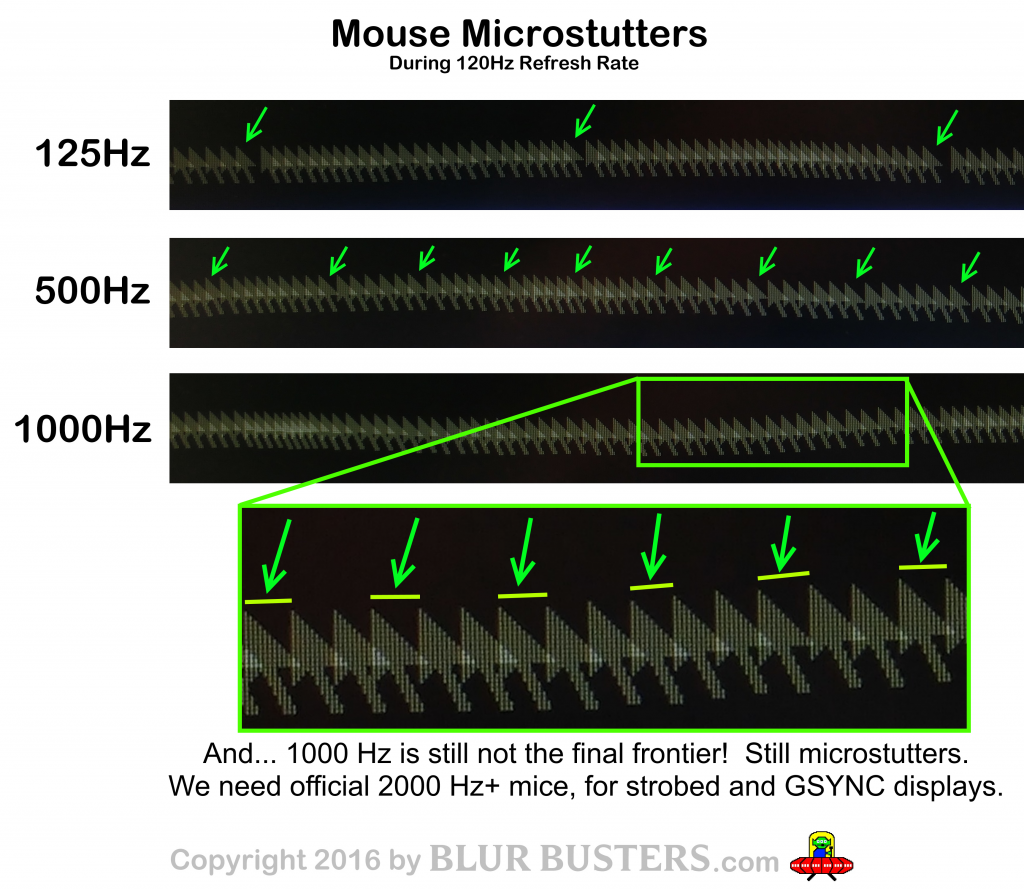
Blur Busters Mouse Guide explains why it's useful to keep increasing the poll frequency (as long as computer capability & sensor accuracy permits). This chart illustrates how computer mice can be a microstutter weak link, especially when the poll rate creates beat-frequency effects against frame rates and/or refresh rates.
In the era of GSYNC monitors & blur reduction monitors eliminating a lot of motion imperfections, the computer mouse can become the microstutter weak link...