Page 1 of 1
is DyAc having an inpact on input lag?
Posted: 22 Oct 2017, 05:01
by HOLECHIEN87
is DyAc having an inpact on input lag?
Re: is DyAc having an inpact on input lag?
Posted: 22 Oct 2017, 05:04
by lexlazootin
DyAc doesn't add any buffering, so no.
Re: is DyAc having an inpact on input lag?
Posted: 23 Oct 2017, 06:03
by dhaine
rtings.com has put some values on the XL2540, so while it's not the 2546 and official DyAc it should be quite similar :
Native Resolution: 3.7 ms
Non-Native Resolution: 3.7 ms
Native Resolution @ 60 Hz: 14.5 ms
Variable Refesh Rate: 3.6 ms
BFI: 5.5 ms (the hidden dyac of 2540)
http://www.rtings.com/monitor/reviews/b ... ng-monitor
Re: is DyAc having an inpact on input lag?
Posted: 23 Oct 2017, 09:01
by RealNC
HOLECHIEN87 wrote:is DyAc having an inpact on input lag?
All backlight strobing methods add a small amount of input lag, due to the image remaining black for a couple millisecond in order to give the LCD pixels time to transition. It can be anywhere between 1-3ms.
This is needed in order to reduce crosstalk, which is the effect where the previous frame is partially visible together with the new frame when the pixels have not fully transitioned to the new colors yet. You can read more about it here:
https://www.blurbusters.com/faq/motion-blur-reduction
The added input lag is low enough to not matter, which is why many people answer "no" to the question of whether it adds input lag. Technically it does, but it's so small that it doesn't affect anything.
Re: is DyAc having an inpact on input lag?
Posted: 11 Apr 2023, 23:34
by Traveler
RealNC wrote: ↑23 Oct 2017, 09:01
HOLECHIEN87 wrote:is DyAc having an inpact on input lag?
All backlight strobing methods add a small amount of input lag, due to the image remaining black for a couple millisecond in order to give the LCD pixels time to transition. It can be anywhere between 1-3ms.
This is needed in order to reduce crosstalk, which is the effect where the previous frame is partially visible together with the new frame when the pixels have not fully transitioned to the new colors yet. You can read more about it here:
https://www.blurbusters.com/faq/motion-blur-reduction
The added input lag is low enough to not matter, which is why many people answer "no" to the question of whether it adds input lag. Technically it does, but it's so small that it doesn't affect anything.
Why is BenQ Zowie openly lying when they say on their website that DyAc+ won't add input lag, since it doesn't add any extra loading to the image processing to the monitor nor to the computer?
Re: is DyAc having an inpact on input lag?
Posted: 12 Apr 2023, 00:57
by Chief Blur Buster
Traveler wrote: ↑11 Apr 2023, 23:34
Why is BenQ Zowie openly lying when they say on their website that DyAc+ won't add input lag, since it doesn't add any extra loading to the image processing to the monitor nor to the computer?
The answer is more complex than a pure yes and no....
Not all pixels refresh at the same time, not all pixels have the same lag. See high speed videos at
www.blurbusters.com/scanout
What this means is that at the time of the strobe flash, some pixels (e.g. typically the bottom screen edge during strobed VSYNC OFF) have less than 1ms lag relative to non-strobed. While other pixels have been refreshed a fairly long time ago and are thus lagged.
While average lag is up, there are some pixels with no lag-increase from strobing, and some pixels that have lag-increase from strobing.
An image from the old "Frequently Asked Questions – Troubleshooting" section of
www.blurbusters.com/strobe-utility (old BenQ version):
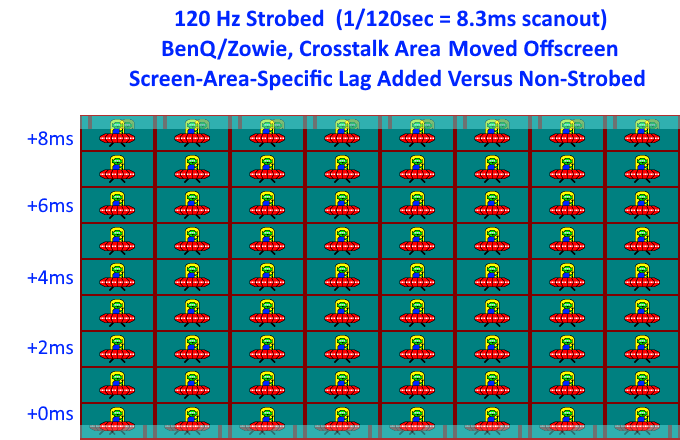
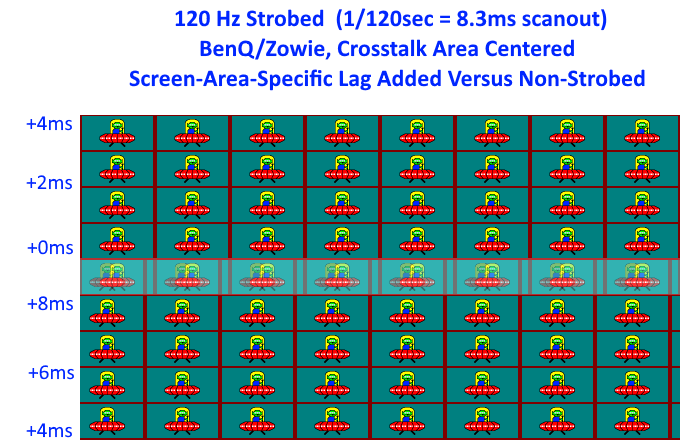
If you want to change the position of your 0ms strobe lag, use Strobe Utility and move the crosstalk bar somewhere slightly underneath your crosshairs.
Re: is DyAc having an inpact on input lag?
Posted: 13 Apr 2023, 04:37
by Traveler
Chief Blur Buster wrote: ↑12 Apr 2023, 00:57
Traveler wrote: ↑11 Apr 2023, 23:34
Why is BenQ Zowie openly lying when they say on their website that DyAc+ won't add input lag, since it doesn't add any extra loading to the image processing to the monitor nor to the computer?
The answer is more complex than a pure yes and no....
Not all pixels refresh at the same time, not all pixels have the same lag. See high speed videos at
www.blurbusters.com/scanout
What this means is that at the time of the strobe flash, some pixels (e.g. typically the bottom screen edge during strobed VSYNC OFF) have less than 1ms lag relative to non-strobed. While other pixels have been refreshed a fairly long time ago and are thus lagged.
While average lag is up, there are some pixels with no lag-increase from strobing, and some pixels that have lag-increase from strobing.
An image from the old "Frequently Asked Questions – Troubleshooting" section of
www.blurbusters.com/strobe-utility (old BenQ version):
If you want to change the position of your 0ms strobe lag, use Strobe Utility and move the crosstalk bar somewhere slightly underneath your crosshairs.

