Page 1 of 1
TestUFO tests showing my display at 60Hz
Posted: 22 Mar 2020, 09:34
by howkey
Hi, I need a help with testufo in Chrome. I tried everything from the
HOWTO: Fix "TestUFO stuck at 60Hz" FAQ but it still shows 60Hz. I also tried latest Opera and Firefox with no luck. Can you help me please?

I'm including user agent and all required screenshots.
User Agent:
Mozilla/5.0 (Windows NT 10.0; Win64; x64) AppleWebKit/537.36 (KHTML, like Gecko) Chrome/80.0.3987.149 Safari/537.36
5.0 (Windows NT 10.0; Win64; x64) AppleWebKit/537.36 (KHTML, like Gecko) Chrome/80.0.3987.149 Safari/537.36
Thank you
Re: TestUFO tests showing my display at 60Hz
Posted: 23 Mar 2020, 18:17
by Chief Blur Buster
This sometimes happens with multimonitor -- when at least one 60Hz television or 60Hz monitor is currently connected.
How many monitors do you have connected?
Can you unplug them temporarily?
If you are single monitor, then troubleshooting becomes more interesting.
Re: TestUFO tests showing my display at 60Hz
Posted: 24 Mar 2020, 01:36
by howkey
I am using only one monitor. I found a reason today. I created custom resolution with overclocked refresh rate (144Hz originaly) two days ago. I forgot to check in monitor OSD if the refresh rate was applied. Monitor shows 60Hz so not. I have 24" iiyama G-Master Red Eagle GB2488HSU-B3 It seems that when I set this custom refresh resolution with overclocked refresh rate, monitor fallbacks to a default setting maybe? I have set it in Radeon software with default G. pixel frequency. When I keep computed value of G. pixel frequency after refresh rate change I got info from my monitor that some value is out of range. Maybe my monitor is not overclockable?
Re: TestUFO tests showing my display at 60Hz
Posted: 24 Mar 2020, 23:00
by Chief Blur Buster
Occasionally, different screens can show different things -- especially with DVI cables and/or older DisplayPort cables -- or when a GPU doesn't support the pixel clock necessary for the overclock. Then different screens sometimes go out of sync.
Incidentially, I created an article,
Oh No, I'm At The Wrong Refresh Rate, since it was common that a monitor was not running at the correct refresh rate. Follow steps 1-5 to find out what refresh rate Windows thinks your monitor is. Get the correct number showing up there first, before using TestUFO.
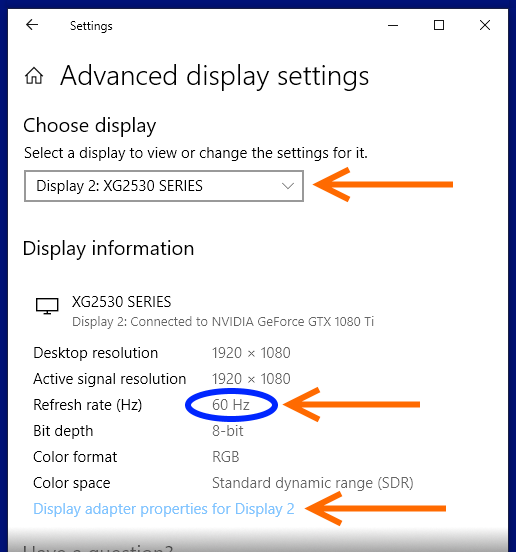
There can be some disagreements between different screens, so that's the most important screen to verify the correct number shows up at.
The monitor's OSD is another method to verify correct refresh rate (at least during fixed-Hz situation).