

Some problem with pc

Everything about latency. This section is mainly user/consumer discussion. (Peer-reviewed scientific discussion should go in Laboratory section). Tips, mouse lag, display lag, game engine lag, network lag, whole input lag chain, VSYNC OFF vs VSYNC ON, and more! Input Lag Articles on Blur Busters.
User avatar
kyube
Posts: 1037
Joined: 29 Jan 2018, 12:03

Re: Some problem with pc

Post by kyube » 18 Apr 2025, 09:00

SKILLEN wrote: ↑
17 Apr 2025, 22:13
Today i bought 2nd hand rx 580 and psu and its okay now.

Still i will post zentimings to check everything is okay.
I don't think using a RX580 is a wise choice, considering how GPU-heavy CS2 is.
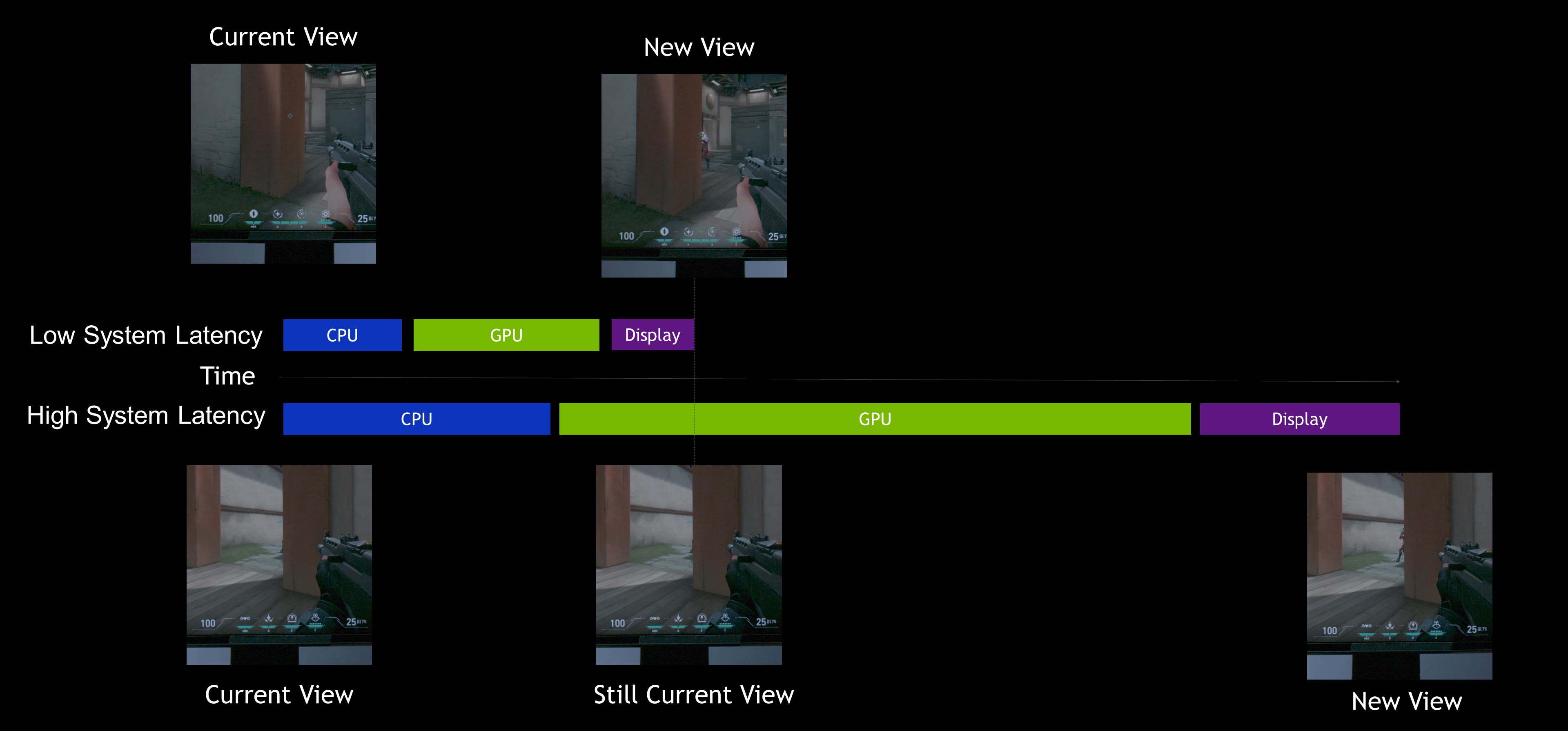
You're just adding a extreme GPU bottleneck, which will affect your total system latency.
Ideally, you'd go for a ~RTX 3070 in performance Nvidia or AMD GPU (the former is better, since CS2 is still DX11)
Image

W10 also isn't the most optimal choice in regards to performance, W11 23H2 is a better option imo, due to the background polling change & fixed timer resolution.

Your RAM kit is also not in the QVL of the motherboard, meaning there's a possibility of instability at play here.
Have you changed any BIOS settings in particular and/or RAM timings? e.g. What is your FCLK set to?
Have you done any stress testing using tools such as RamTestPro (purple icon), HCI MemTestPro, ycruncher & other tools?
I would not go for >3200MHz on these X3D CPUs, especially not if your main game is CS2.
The increase you'd get from JEDEC (no OC) to EXPO (AMD-specific timings) / XMP (Intel-specific timings) is miniscule compared to the gain you'd get in UE games.
Of course, it might not be the case, but this is what I use as my source: https://kingfaris.co.uk/blog/intel-ram-oc-impact/csgo
I've somewhat extrapolated this paragraph from the information of that link.
Last edited by kyube on 18 Apr 2025, 11:20, edited 1 time in total.

joseph_from_pilsen
Posts: 255
Joined: 01 Apr 2022, 23:51

Re: Some problem with pc

Post by joseph_from_pilsen » 18 Apr 2025, 10:00

I presented the same opinion about polaris AMD gpu too, but he explained it to me with his deagle personally at server so...
At lowest details the polaris can do its work, even if its a bit subpar, at least this crap has enough VRAM but i strongly recommend to overclock it as every tiny bit of performance matters at such low HW. But it goes extremelly GPU bottlenecked at any higher details and resolution, the polaris loses steam very fast with GPU setting increase.

SKILLEN
Posts: 149
Joined: 01 Sep 2020, 23:08

Re: Some problem with pc

Post by SKILLEN » 18 Apr 2025, 16:19

I disabled EXPO/XMP and put RAM to 3000mhz - i didnt notice performance increase or decrease ,but i will leave it to 3000mhz.

I know guys 580 8gb is not very good ,but today i got another one :lol: . Now i have amd crossfire and the fps increased,little screen flickering ,but its not problem.

I told you ,at least now i can kill(its true) ,but this prefire and when dying camera fixing position is still happening ,even when i watch teammates. It could be the game,but i dont remember even 1 time this happening with rx 550 , did you noticed something like this when you get killed ?


After i installed 2nd rx580 when im dead and spectating my fps drops to 80 ,100,120 then returning to normal,after 10-30 seconds same thing. When i'm alive and playing this doesnt happen,its not problem ,but why is happening

User avatar
kyube
Posts: 1037
Joined: 29 Jan 2018, 12:03

Re: Some problem with pc

Post by kyube » 18 Apr 2025, 17:41

SKILLEN wrote: ↑
18 Apr 2025, 16:19
I disabled EXPO/XMP and put RAM to 3000mhz - i didnt notice performance increase or decrease ,but i will leave it to 3000mhz.
It would be good to reinstall afterwards, if you were unstable you could've corrupted your OS thus further exacerbating the issue.
Can't know for sure unless you troubleshoot this yourself or find someone else to do it for you.
SKILLEN wrote: ↑
18 Apr 2025, 16:19
I know guys 580 8gb is not very good ,but today i got another one :lol: . Now i have amd crossfire and the fps increased,little screen flickering ,but its not problem.
I told you ,at least now i can kill(its true) ,but this prefire and when dying camera fixing position is still happening ,even when i watch teammates. It could be the game,but i dont remember even 1 time this happening with rx 550 , did you noticed something like this when you get killed ?
After i installed 2nd rx580 when im dead and spectating my fps drops to 80 ,100,120 then returning to normal,after 10-30 seconds same thing. When i'm alive and playing this doesnt happen,its not problem ,but why is happening
I think you should consider purchasing a RDNA2 GPU such as the 6800XT and run CS2 with the Vulkan API or a purchase a NVIDIA RTX3080 and run it on the default DX11 API.
Crossfiring GPUs which are permanently on +99% GPU usage regardless of scenario is ridiculous.
Your issues are not related to your GPU, they're rooted in SW (OS and/or GPU, NIC drivers, BIOS) and/or HW instability.

The other possibility down the chain is networking hardware (server or yours) and/or ISP sheningans.
And the other possibilities are rooted in psychology & human physiology.

JimCarry
Posts: 586
Joined: 24 May 2024, 20:01
Location: csgo

Re: Some problem with pc

Post by JimCarry » 18 Apr 2025, 19:49

SKILLEN wrote: ↑
18 Apr 2025, 16:19


After i installed 2nd rx580 when im dead and spectating my fps drops to 80 ,100,120 then returning to normal,after 10-30 seconds same thing. When i'm alive and playing this doesnt happen,its not problem ,but why is happening
i know what you are talking about,when you are playing its lets say 300+ fps but when you die and spectate your teammaates,it drops to 60 80 ~90,i think i use to have this when i first build my new pc,i am pretty sure its a power saving feature,go download radeonmod and read inside of it there is so much tweaks almost every one works.on cs2 not everything.but in the program you can read apply restart test,if you dont like it revert.also i have reg edit from youtuber with amd power savings and melodys are inside of it.

Post Reply