Ask about
motion blur reduction in gaming monitors. Includes ULMB (Ultra Low Motion Blur), NVIDIA LightBoost, ASUS ELMB, BenQ/Zowie DyAc, ToastyX, black frame insertion (BFI), and now framerate-based motion blur reduction (framegen / LSS / etc).
-
brownvim
- Posts: 228
- Joined: 22 Jun 2020, 04:15
Post
by brownvim » 08 Jul 2026, 07:14
nuninho1980 wrote: ↑08 Jul 2026, 05:32
brownvim wrote: ↑07 Jul 2026, 17:36
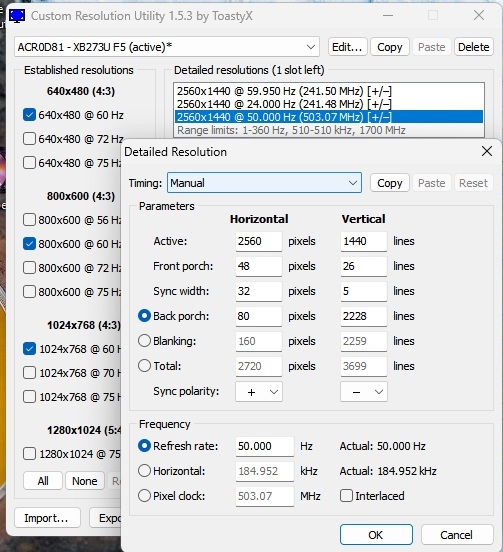
I think its possible within Windows, I made a custom resolution of 50hz with the CRU program and it seems to work, I would need someone else to confirm. CRU settings below:
I did play a 50fps video on YouTube and it looked smooth and clear:
https://www.youtube.com/watch?v=-HqB15g_sCA&t=21s
Note this mode flickers even more than the 60hz mode! The 60hz mode flicker doesn't bother me but I think this would bother me using it an extended time.
The pulse width adjustments are still available in this mode too.
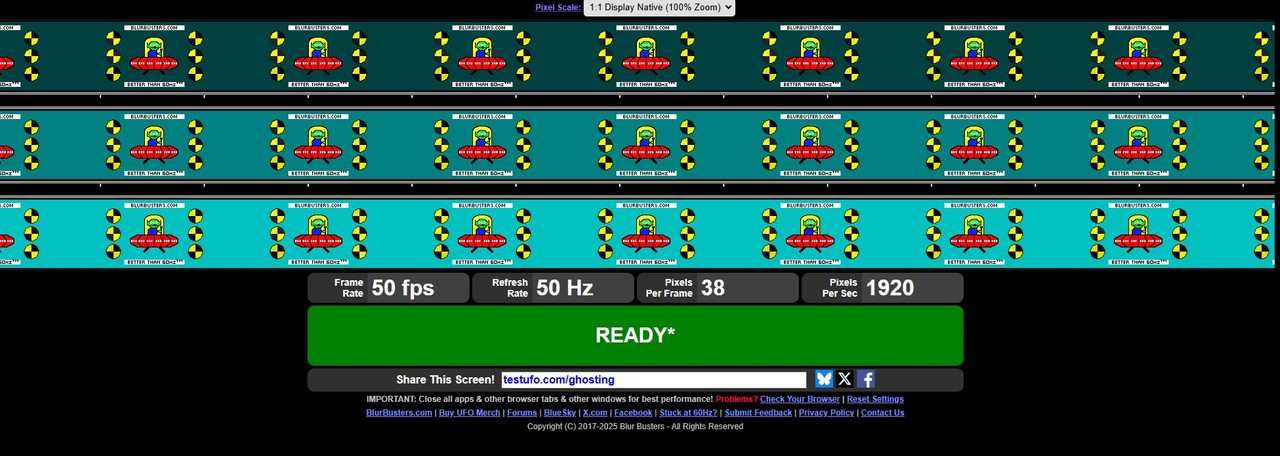
Checked UFO test and it confirms its 50hz, it also says on the Acer OSD that its running at 50hz.
Thank you!!

I'm selling current ViewSonic monitor... Then I'll buy this Acer monitor in this month...
Best regards.

I wouldn’t buy it for the 50hz mode, I can see why it’s not officially supported.
It has a lot of image retention.
5800X3D, RTX 5080 FE, OLED AW3423DW + Acer Pulsar XB273U F5
-
nuninho1980
- Posts: 210
- Joined: 26 Dec 2013, 09:49
-
Contact:
Post
by nuninho1980 » 08 Jul 2026, 17:06
brownvim wrote: ↑08 Jul 2026, 07:14
It has a lot of image retention.
If it's "hardware" strobe, LCD doesn't suffer burn-in because LCD doesn't use flickering. LED backlight is (very) cheap but up to 60k hours of lifespan while LCD is very expensive but fortunately, between 100 and 150 years of lifespan.

CPU: i7-12700KF@stock without E-core
RAM: 2x16GB DDR4@3600MHz
MB: MSI PRO Z690-A DDR4
GPU: Zotac RTX 4090 non-OC <3
Opt. disc: LG BD-RE writer BH16NS40
HDD: SATA 1TB
SSDs: OCZ RD400 0.5TB+Crucial MX500 2TB
PSU: AEROCOOL 1kW 80+ Gold
Disly: ACER Predator XB273U F5 !NEW!

-
brownvim
- Posts: 228
- Joined: 22 Jun 2020, 04:15
Post
by brownvim » 08 Jul 2026, 17:28
Just to clarify, I meant image retention, not burn-in, which is a bit different.
What I'm seeing is that desktop icons stay faintly visible as an overlay when watching video, and it takes a while for them to fade away.
5800X3D, RTX 5080 FE, OLED AW3423DW + Acer Pulsar XB273U F5
-
zenki
- Posts: 1
- Joined: 08 Jul 2026, 20:36
Post
by zenki » 09 Jul 2026, 02:54
Anyone can help?
Didn't have the issue with other monitor.
Specs:
win10 21h2, rtx5070, acer XB273U F5 v1.1.8
-
Attachments
-

- lk54mt.jpg (1.13 MiB) Viewed 644 times
-
nuninho1980
- Posts: 210
- Joined: 26 Dec 2013, 09:49
-
Contact:
Post
by nuninho1980 » 22 Jul 2026, 09:25
brownvim wrote: ↑08 Jul 2026, 17:28
Just to clarify, I meant image retention, not burn-in, which is a bit different.
What I'm seeing is that desktop icons stay faintly visible as an overlay when watching video, and it takes a while for them to fade away.
Ok. But 50Hz + HW strobing ( = LED strobing ) won't harm LCD screen because the temperature isn't high - only cooler than 35~40 ºC. But yes hotter than 60 ºC can degrade or ruin LCD.
CPU: i7-12700KF@stock without E-core
RAM: 2x16GB DDR4@3600MHz
MB: MSI PRO Z690-A DDR4
GPU: Zotac RTX 4090 non-OC <3
Opt. disc: LG BD-RE writer BH16NS40
HDD: SATA 1TB
SSDs: OCZ RD400 0.5TB+Crucial MX500 2TB
PSU: AEROCOOL 1kW 80+ Gold
Disly: ACER Predator XB273U F5 !NEW!
-
Chief Blur Buster
- Site Admin
- Posts: 12284
- Joined: 05 Dec 2013, 15:44
- Location: Toronto / Hamilton, Ontario, Canada
-
Contact:
Post
by Chief Blur Buster » 24 Jul 2026, 13:32
brownvim wrote: ↑08 Jul 2026, 17:28
Just to clarify, I meant image retention, not burn-in, which is a bit different.
What I'm seeing is that desktop icons stay faintly visible as an overlay when watching video, and it takes a while for them to fade away.
This is caused by bugs in the LCD inversion algorithm, if it's not caused by an even-count frame flicker frequency (e.g. software BFI, stereoscopic graphics, etc)
-
RynoW
- Posts: 8
- Joined: 06 Jan 2026, 17:39
Post
by RynoW » 29 Jul 2026, 15:06
Is there a reason not to go for this one over the others, given the price delta? The reviews on Amazon and Newegg aren't good but it's always hard to tell what is and isn't user error
-
pgz
- Posts: 12
- Joined: 12 Jan 2026, 18:24
Post
by pgz » 29 Jul 2026, 15:37
RynoW wrote: ↑29 Jul 2026, 15:06
Is there a reason not to go for this one over the others, given the price delta? The reviews on Amazon and Newegg aren't good but it's always hard to tell what is and isn't user error
I had this model before and did return it. But there was nothing wrong with it when I was using it. I used multiple models of the pulsar monitors now.
I would say this is a buy. I think it is just sitting and not selling maybe.
I returned it cause well, I didn't like the stand, and tried to the MSI model. But that model gave me a dead pixel. I returned the MSI one, and now I just bought his one.
edit: Price is now showing $369.99 instead of the $379.99 earlier today. I was able to call them back and get a refund.
Last edited by
pgz on 29 Jul 2026, 18:14, edited 1 time in total.
-
pgz
- Posts: 12
- Joined: 12 Jan 2026, 18:24
Post
by pgz » 29 Jul 2026, 18:14
Does anyone have the link for the actual manual for this monitor? I cannot find it at all.