
NVIDIA G-Sync Pulsar monitor - Asus ROG Strix XG27AQNGV
-
nuninho1980

- Posts: 217
- Joined: 26 Dec 2013, 09:49
- Contact:
Re: NVIDIA G-Sync Pulsar monitor - Asus ROG Strix XG27AQNGV
Are you worried high input lag at 60Hz or 120Hz with ULMB2-enabled? No worry needed for me despite 60Hz on my Acer Pulsar monitor.
CPU: i7-12700KF@stock without E-core
RAM: 2x16GB DDR4@3600MHz
MB: MSI PRO Z690-A DDR4
GPU: Zotac RTX 4090 non-OC <3
Opt. disc: LG BD-RE writer BH16NS40
HDD: SATA 1TB
SSDs: OCZ RD400 0.5TB+Crucial MX500 2TB
PSU: AEROCOOL 1kW 80+ Gold
Disly: ACER Predator XB273U F5 !NEW!
RAM: 2x16GB DDR4@3600MHz
MB: MSI PRO Z690-A DDR4
GPU: Zotac RTX 4090 non-OC <3
Opt. disc: LG BD-RE writer BH16NS40
HDD: SATA 1TB
SSDs: OCZ RD400 0.5TB+Crucial MX500 2TB
PSU: AEROCOOL 1kW 80+ Gold
Disly: ACER Predator XB273U F5 !NEW!
-
Chief Blur Buster

- Site Admin
- Posts: 12288
- Joined: 05 Dec 2013, 15:44
- Location: Toronto / Hamilton, Ontario, Canada
- Contact:
Re: NVIDIA G-Sync Pulsar monitor - Asus ROG Strix XG27AQNGV
There's some caveats with that.
1. At 1000fps, LCD GtG 3%->97% needs to be literally 0.1ms or faster to prevent strobe crosstalk
2. At 1000fps sample and hold, you can get 1ms MPRT without strobing.
Brute framerate-based motion blur reduction can actually outperform strobing today. I have a 720 Hz OLED can go as low as 1.4ms MPRT (1/720sec at 720fps) having less motion blur without BFI or strobing than LightBoost (2.4ms MPRT in year 2013).
Motion blur of strobed = pulsetime
Motion blur of unstrobed = frametime
If you can get frametimes faster than your old pulsewidth, sample and hold can have less motion blur than BFI or strobing! The venn diagram overlaps if you have enough GPU power.
In addition to being difficult to speed up LCD GtG faster than refresh cycles in order to avoid strobe crosstalk, it gets harder when refreshtime:GtGtime ratio is not big enough.

Pulsar is lovely and amazing, but it is possibly a dead-end technology for 1000fps 1000Hz. Pulsar is more useful for the current refresh rate range it supports, and there is 60 years of legacy 60fps 60Hz content.
Head of Blur Busters - BlurBusters.com | TestUFO.com | Follow @BlurBusters on: BlueSky | Twitter | Facebook

Forum Rules wrote: 1. Rule #1: Be Nice. This is published forum rule #1. Even To Newbies & People You Disagree With!
2. Please report rule violations If you see a post that violates forum rules, then report the post.
3. ALWAYS respect indie testers here. See how indies are bootstrapping Blur Busters research!
-
Chief Blur Buster
- Site Admin
- Posts: 12288
- Joined: 05 Dec 2013, 15:44
- Location: Toronto / Hamilton, Ontario, Canada
- Contact:
Re: NVIDIA G-Sync Pulsar monitor - Asus ROG Strix XG27AQNGV
CRT is the gold standard but it isn't full perfect. Ashun's aperturegrille image is as follows:
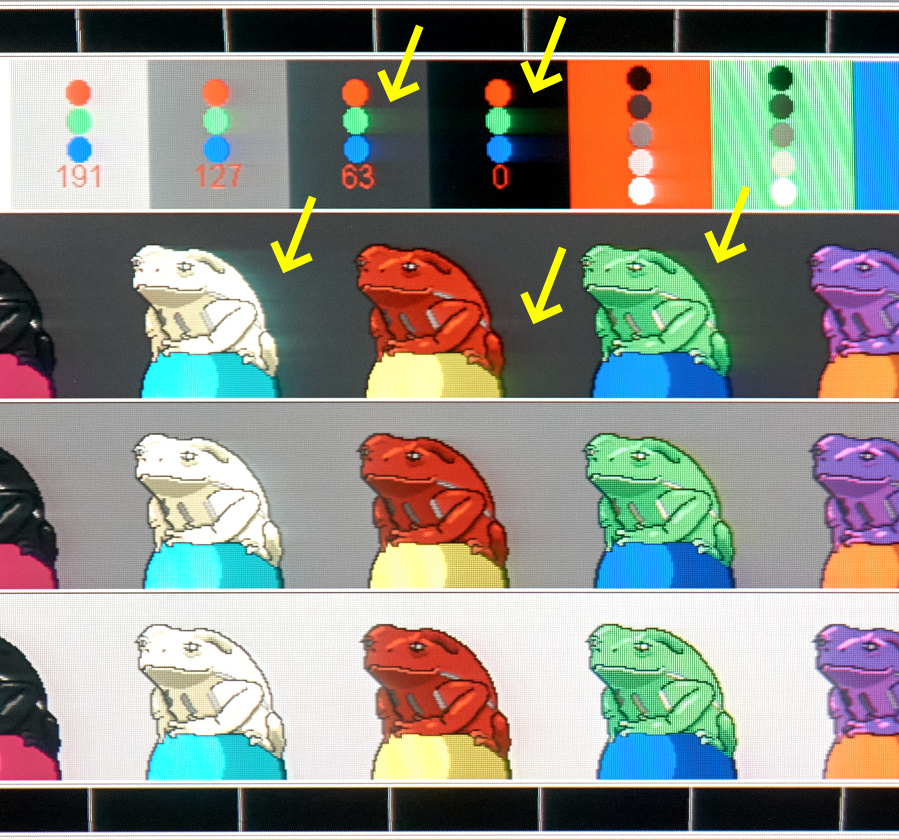
I can make a cherrypicked "top 1%-ile" of LCD's outperform a FW900 CRT simply by avoiding this, by using 60-100 Hz strobing + ginormous refresh rate headroom. Also, most LCD VR headsets now outperform a FW900 CRT, at least for refresh rates that the VR headset supports.
Obviously, colors and blacks won't be as good as CRT, but I already routinely beat FW900 CRT with the refresh-rate headroom trick. No an easy adjustment, and not enough vendors enable it, but it works on the XG2431:
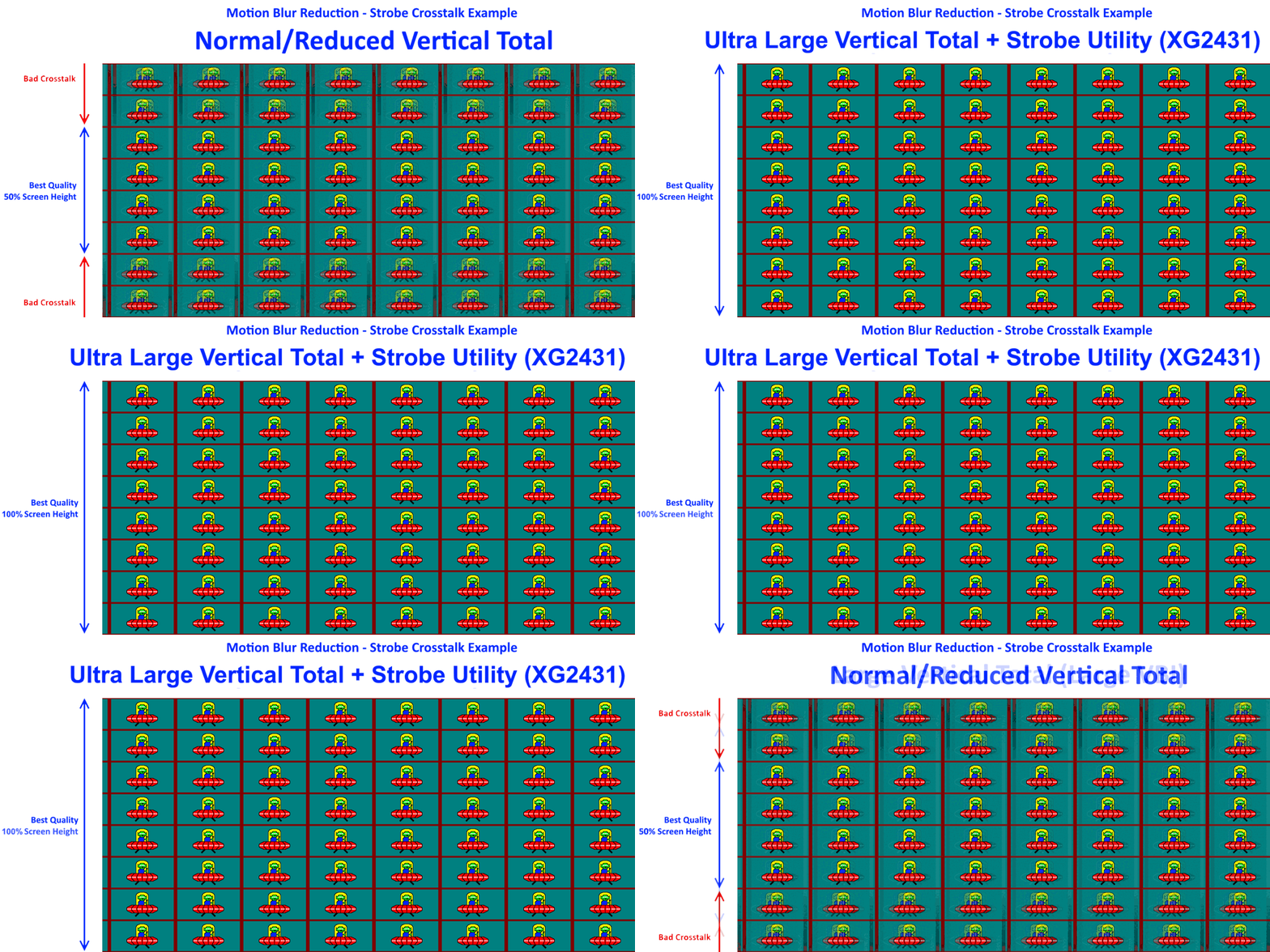
Large blanking intervals big enough to hide LCD GtG betwee nrefresh cycles. This requires using a low Hz on a ultra-high-Hz LCD (e.g. 200 Hz mode on a 1000 Hz LCD) to allow an LCD to spend 80% of its time idling between refresh cycles (e.g. 0.8/200sec) to hide pixel transitions in total darkness between refresh cycles.
1. Ginormous refersh rate headroom (targetHz:maxHz)
2. Large blanking intervals
3. Good strobe tuning
4. Fast enough LCD GtG
And then you have an infinite motion clarity headroom on an LCD, that just merely depends on how brightly you can strobe a backlight (half pulsewidth = need to strobe twice as bright for same brightness at half persistence), aka Talbot-Plateau Theorem.
Head of Blur Busters - BlurBusters.com | TestUFO.com | Follow @BlurBusters on: BlueSky | Twitter | Facebook
Forum Rules wrote: 1. Rule #1: Be Nice. This is published forum rule #1. Even To Newbies & People You Disagree With!
2. Please report rule violations If you see a post that violates forum rules, then report the post.
3. ALWAYS respect indie testers here. See how indies are bootstrapping Blur Busters research!
-
Evolvo
- Posts: 3
- Joined: 24 Sep 2026, 03:45
Re: NVIDIA G-Sync Pulsar monitor - Asus ROG Strix XG27AQNGV
Thanks for the reply. So, in my situation—considering my current monitor and gaming habits (by the way, I never play online)—which do you think would be better: OLED or Pulsar?tsarri wrote: ↑22 Sep 2026, 12:29I'm wondering as well and its part of the reason why I still use Pulsar at that refresh rate range. I find the latency is too distracting with 120Hz ULMB2 + V-Sync.hammelgammler wrote: ↑22 Sep 2026, 06:58Does someone know a trick to have the lowest latency but still no tearing with 120Hz ULMB2?
I tried various forms of scanline sync, but in all cases I can’t seem to get it to work flawlessly, at one point the tear line is back. Also moving the line up/down does not really work as expected, neither with SpecialK nor RTSS. When I move the line 1 up/down, the tool syncs again and the line is at a random spot again.
I saw that fast sync with a (actual Hz - 0.01) limit seemingly has the lowest latency and still no tearing? Interestingly enough, it seems to work in some games, but not with all. Is that normal?
Besides that, low-lag V-Sync does work pretty reliable, but it stutters a bit, which is of course way more obvious with great motion clarity.
-
Evolvo
- Posts: 3
- Joined: 24 Sep 2026, 03:45
Re: NVIDIA G-Sync Pulsar monitor - Asus ROG Strix XG27AQNGV
Thanks for the reply. So, in my situation—considering my current monitor and gaming habits (by the way, I never play online)—which do you think would be better: OLED or Pulsar?t2na wrote: ↑24 Sep 2026, 11:281. Haven't experienced either - but this can differ from person to person. I will say it does take me a few days to get my eyes used to strobing after not using it for a while - but nothing in terms of eye strain or flicker.
2. Can't say I've noticed any at all for the games I've played at that fps range.
3. Yeah, I really enjoyed playing AC Shadows at around 90fps on the Pulsar monitor. It just made everything feel smoother and more clear at every point. I also did enjoy playing the game on an OLED though for how gorgeous it looked - but it was never as clear in motion as on the Pulsar and unfortunately AC Shadows has plenty of moments where you get dark scenes with fps fluctuations which didn't help with VRR flicker.
-
kyube

- Posts: 1020
- Joined: 29 Jan 2018, 12:03
Re: NVIDIA G-Sync Pulsar monitor - Asus ROG Strix XG27AQNGV
Has anyone done any pursuit photographs on these models? Surely, the G2G RT's @ 120-144Hz result in some form of crosstalk at these low pulse on times?Chief Blur Buster wrote: ↑27 Sep 2026, 14:43Also, most LCD VR headsets now outperform a FW900 CRT, at least for refresh rates that the VR headset supports.
Namely: Valve Index & Meta Quest 3 (which are both quoted to be ~300µs pulse on time, close to the KTC)
The voltage boosting they're doing must be absurdly high.
If the claim of ~160cd/m² brightness is true, then it's ~3,6% duty cycle @ 120-144Hz.
This implies it's doing ~4444,44 cd/m² of voltage boosting, which would be the highest I've seen any consumer LCD do.
I'm surprised that it doesn't burn down in an instant
XG2431 is around 1/7 of that voltage boosting value.
That's all great in theory, but the "merely" part is exactly where >95% of implementations on the market falter.Chief Blur Buster wrote: ↑27 Sep 2026, 14:43...
And then you have an infinite motion clarity headroom on an LCD, that just merely depends on how brightly you can strobe a backlight (half pulsewidth = need to strobe twice as bright for same brightness at half persistence), aka Talbot-Plateau Theorem.
Out of all backlight strobing models on the market (even ones which aren't), only the:
- BenQ XL2566K (has VCP commands for lower duty cycle)
- Pulsar panels (ULMB2 60Hz & 120Hz; 240 & 360Hz seemingly does less boosting) & PG27AQN (sadly riddled with KSF, which is noticable on +3000 px/s speeds even on higher refresh rates)
- KTC M27P6 (~0,375ms pulse on @ FHD mode; ~0,7-0,8ms @ 4K mode)
are doing sufficiently enough voltage boosting to support chasing high effective motion clarity AKA low pulse on time.
XG2431's voltage boosting is ~2,5x smaller than the aforementioned models. This is insufficient on lower refresh rates (<120Hz)
For higher refresh rates (+200Hz), the G2G RT's are getting slower & thus lead to crosstalk.
Of course, this entire discussion depends on the actual pixel speed at which the game is being played it.
If the game in question is mostly within 600-900 px/s for someone, then most implementations on the market would be fine, provided the brightness is fine for the user.
evaluating xhci controller performance | audio latency discussion thread | "Why is LatencyMon not desirable to objectively measure DPC/ISR driver performance" | AM4 / AM5 system tuning considerations | latency-oriented HW considerations | “xhci hand-off” setting considerations | #1 tip for electricity-related topics | ESPORTS: Latency Perception, Temporal Ventriloquism & Horizon of Simultaneity | good lcd backlight strobing implementation list | display vs gpu scaling
-
hammelgammler
- Posts: 51
- Joined: 16 Mar 2015, 11:32
Re: NVIDIA G-Sync Pulsar monitor - Asus ROG Strix XG27AQNGV
Interesting, I read that at least the Index has ~0,5ms MPRT? Also, is this fixed for all refresh rates? As far as I understand it, given the same pulse on time, a higher refresh (e.g. 60Hz -> 120Hz) should still half the MPRT, because the pulse on time is for each frame.kyube wrote: ↑28 Sep 2026, 03:02Has anyone done any pursuit photographs on these models? Surely, the G2G RT's @ 120-144Hz result in some form of crosstalk at these low pulse on times?
Namely: Valve Index & Meta Quest 3 (which are both quoted to be ~300µs pulse on time, close to the KTC)
The voltage boosting they're doing must be absurdly high.
Also, now with the new firmware, the Q3 seemingly supports 207Hz at it‘s native resolution and also 240Hz at lower res. Wouldn’t that mean that the 207Hz mode clarity should be absurdly good?
I would also really love to get some numbers for all the other VR headsets, namely for the OLED models (Play for Dream, Pimax Dream Air, Bigscreen Beyond, …), because at least on the BSB, if you increase the brightness, the worse it gets in terms of persistence, so far that you seemingly get very visible smearing.
So I would assume that maybe, same as on monitors, (VR) LCDs are currently the best in terms of clarity, because they too can push brightness further? But to be fair, the good OLED panels, like the Play for Dream has, can get very bright as well.
-
wiseude
- Posts: 60
- Joined: 27 Jan 2019, 12:42
Re: NVIDIA G-Sync Pulsar monitor - Asus ROG Strix XG27AQNGV
Monitor just arrived in perfect condition.It's really bright compared to what I'm used too but it works fine so far.(i updated the firmware aswell)
Using these settings:
Brightness dropped to 100
Contrast to 80
Game visual on Racing mode
Dark boost on 1
Color Temp on User mode 100R 98G 94B
Think il reduce the contrast a tiny bit more because its still a bit bright.
Got 2 questions.
1.Is it normal that is slighty warm to the touch on the bottom right/upper right part of the monitor@?
2.Anyone else got some settings I should tweak
3.Will pulsar effect browsing aswell or just strictly gaming?
Thank you.
Using these settings:
Brightness dropped to 100
Contrast to 80
Game visual on Racing mode
Dark boost on 1
Color Temp on User mode 100R 98G 94B
Think il reduce the contrast a tiny bit more because its still a bit bright.
Got 2 questions.
1.Is it normal that is slighty warm to the touch on the bottom right/upper right part of the monitor@?
2.Anyone else got some settings I should tweak
3.Will pulsar effect browsing aswell or just strictly gaming?
Thank you.
-
liquidshadowfox
- Posts: 285
- Joined: 05 Nov 2020, 14:03
Re: NVIDIA G-Sync Pulsar monitor - Asus ROG Strix XG27AQNGV
Technically that's 3 questions! lol butwiseude wrote: ↑Yesterday, 09:24Monitor just arrived in perfect condition.It's really bright compared to what I'm used too but it works fine so far.(i updated the firmware aswell)
Using these settings:
Brightness dropped to 100
Contrast to 80
Game visual on Racing mode
Dark boost on 1
Color Temp on User mode 100R 98G 94B
Think il reduce the contrast a tiny bit more because its still a bit bright.
Got 2 questions.
1.Is it normal that is slighty warm to the touch on the bottom right/upper right part of the monitor@?
2.Anyone else got some settings I should tweak
3.Will pulsar effect browsing aswell or just strictly gaming?
Thank you.
1. Somewhat normal be keep an eye on it because some units are defective and overheat (probably bad heatsink contact or something) and will cause the panel to shutdown during Gsync pulsar operation to prevent damage. If it only ever stays warm and everything works, it should be ok
2. I don't, I just left most things default, 78 contrast, 100 brightness and yes it's still too bright which is why I think nvidia needs to add a "pulsar extreme" mode that halves the max brightness but gives us sharper visuals in exchange

3. It affects everything