Ok, I have already posted this at hardforums, but for reference I will post my complete review here!
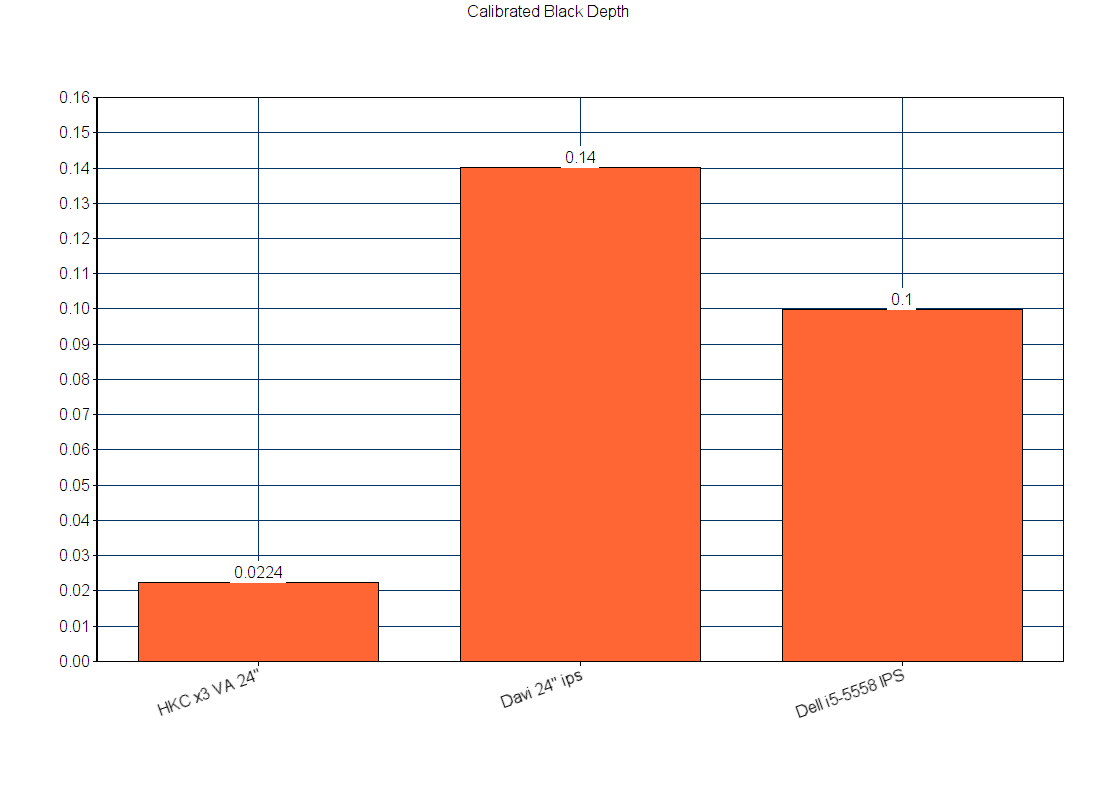
- 20160603085654.png (25.15 KiB) Viewed 17539 times
OK guys, I have used this monitor long enough to make a CONCLUSIVE review
Please read if you want some quality material to help you fall asleep at night!
Build Quality:
The monitor stand is weighted with some mixed metal ore and does has a hexa-triangular shaped base for support. It is not very wobbly.
Overall the quality of monitor materials and stability is somewhere in between. IT is definitely not typical cheap crap
I have found on budget Samsung screens, Benq or those monitors that fall over when someone farts as they walk by.
Oh, maybe that's only me?
oops.. I would say is pretty good, but just not as rugged as Dell or NEC. It wouldnt be good to fall off the table onto a hard floor.
But would I trust dropping a Dell ultrasharp ? No.
The monitor has excellent height adjustment, can be tilted forward or back. Finally, it and can be rotated vertically.
I think? Those 4 holes are for VESA mounts, but I haven't tested if they fit perfectly.
The ports seem strong enough for removal without much worry.
4/5
Warranty:
LOL, well won't apply since I got this import and through a work of art over a Taobao agent! If you ever use a taobao agent, just ask me
I went through 5 of them and they all tried to slice off my hand and rob me. I finally found one that does thousands of
good transactions a year and is very low cost. I took a big risk and would have had little recourse to get a refund, but my gamble
paid off since I scored a great monitor!
In China, you might have yourself a standard warranty. I think there's a slipcard thats written in all Chinese; I'm guessing that's
the warranty.
N/A
Gaming.. Continued:
The high res screencaps of DOOM 2016 and the uncompressed video just blew me away.
LINK:
With 5300:1 Contrast ratio, this is "THE MONITOR" for DOOM.
The amount of depth and detail is just staggering, you could look into the darks and stare and
still see further. This screen surely is far superior to the 842:1 (the avg contrast to most gamers) IPS screen I had to view this
and now I'm curious to how great this will look on OLED.
For Battlefield, the many shades of black and gray in LOCKER are a bit staggering. You will Find your enemy
hiding in the dark shadows and be able to track a running target pretty well on high tick rate servers.
For Games like Overwatch, the beautiful colors of the monitor represents this game as intended in its full glory.
Since the game uses a narrow contrast range with no blacks at all (darkest color is charcoal gray)
You will not find difference between this and a fast IPS screen. It is very obvious that this
that game is optimized for a variety of screen types, so even a bad panel will suffice. The game
is already smooth by nature, but adding 144hz on top of this makes the game surreal and breathtaking.
With little input lag and fantastic pixel response and Refresh rate, you will not find much advantage of getting a TN panel. IN FACT, if you were gonna spend <$300 on a local TN panel, i'd advise you not to and get this. Even uncalibrated, the colors look better than TN and you have the speed to match up.
While 4k and 1440p are nicer to look at, you will sacrifice either contrast, refresh rate or both. There is no one size fits all
gaming monitor.
4.5/5
Office work/typical usage/productivity software
Most people are moving up to 27" and higher res screens, so this won't really appeal to those
whose focus is strictly on that. However, after calibration, this screen is pretty comfortable to
view for many hours and is sharp with text. You still have enough space to
work with for FL studio, Photoshop and having 2 word docs side by side.
The last u pdates to these programs seem to have been optimized to run on 1080p. But 4k is simply better.
I did check, and FL STUDIO scales perfectly within 4k gui.
PWM drives me crazy, but I haven't found anything. The green/blue light is quite strong before calibration, so don't let that
confuse you --as that was a source of previous headaches.
You know whats neat? Is you can drag around any UI window and it's soooo smooth that you can still read it.
120hz is just unreal!
I would say 1080p is OK,
but nothing really exciting for pure productivity, as better options exist for size, resolution and
aren't dependent on contrast ratio or pixel speed.
4/5
Movies Continued:
You will find no flaw in watching a screen this nice for Blu Ray. This screen was perfectly built to all of its specifications.
In fact, TV reviews put the contrast ratio as the main weight in performance of the screen. The CR actually bests the top range
of all LCD tvs up to 2015. At an impressive 5300:1, only a few TVs will beat it. This year Vizio and Samsung came out with some superior
HDR capable screens that
do 6800:1 , but in the previous year Samsung topped out at 3000:1 and Sony 4900:1 for top models.
I have to agree that this is extremely important to cinema. The amount of depth, realism and detail makes for a far more
immersive experience. Even on a smaller screen, I felt more immersed watching Star Wars plasma bolts blinding my eyes,
whizzing through the ominous black sky.
The next important weight is Color. This monitor fits the standard specs for Blu ray. It encompasses 96% of the SRGB space/rec 709 and then some high range
greens for adobe gamma.
Fortunately, calibrating this screen twice brought this beast down to 0.42 deltaE!
While none of the calibrations from DisplayCal were bad,
SRGB mode came out least favorable, with BT 1886 as central and GAMMA 2.2 the best. Here I got the highest color accuracy and
contrast. The other two sacrificed a few % to either contrast darkness or color accuracy. I highly recommend using Gamma 2.2 in
Displaycal for i1 Dispaly Pro.
TV review sites then look at motion clarity and pulldown ability. The latter is handled by the software and video card, so the
screen itself has its hands clean of that. However, the monitor has no issue handling smooth motion when directly fed through PS3
watching Pirates of the Carribean. The fast pixel response of the monitor surely helped messy action scenes become easily trackable
by casual movement of your eye. A lot of TVs out there will blur this motion, but no problem at all for this screen.
The whole experience is buttery smooth.
ON the contrary, tech moves so fast that it brings this score down a bit. With cinematographers pushing more black depth into OLED
then with 4k and HDR, cinema gurus are already abandoning
the 1080p LCD spec.
4.2/5
Photography editing/Pic viewing
2016-06-12 22.59.43. 2016-06-12 23.00.16.
For Photography, its recommended to get a 27-30" Screen, or even bigger with a high PPI and a
glossy coating. BUT the color accuracy and contrast helps greatly to offset these limitations.
With DeltaE 0.42E (recalibrated 6/11/16).
This brings this screen down slightly more accurate than my Davi 24" IPS which uses the same
panel as the apple cinema circa 2010.
The contrast really does this screen a giant favor. Photos viewed are very rich with depth
and saturation. Side by side, certain pictures look fantastic on the HKC but are really washed
out garbage on the IPS screen(s). Even brighter pictures
seem to benefit. I used a variety of pictures 4k and 1080p, from Gratisphography and 3
k wallpaper sites.
The range of dark values of all colors made most of the pictures pop out of the screen. There is a lot
of depth that I've never experienced before outside of OLED and CRT.
With this color accuracy AND contrast, you will find litle advantage of buying any of the 24" 1080p Ips screens
on the market
OF course, there will be absolutely no advantage of hunting down any other VA panel, as it tops
all other VA monitors for contrast ratio and color accuracy.
4.2/5
Pros
---
+Highest contrast ratio ever tested (and I had the honor lol). 5312:1
+Very high color accuracy, IPS killer <0.42 DeltaE
+Might be better than any TN in almost every way.
+Very fast and stable 120hz, buttery smooth games
+Very smooth film motion, especially action sequence and particles
+No noticeable lag, competition ready.
+Fully adjustable stand, tilt, height and rotation
+Good connectivity: DP, HDMI, DVI, Audio for a soundbar, speakers.
+Works fantastic for consoles, HDCP ready.
+Eizo Fg2421 altenative that addresses its weaknesses.
+No dead pixels
+Company is reputable in China
+Overall has all the pros of TN/VA and IPS
+Good price
Neutral
----
-Light AG coating
Most people like this, but it is a bane to me who sees a dry sandy film grain texture on everything and prefers
crystal clear coats. Reflections are not an enemy but now is ambient diffused light to
rob picture quality.
-Very loud Chinese gamer design; red n black will match MSI or ASUS. Not crazy about the
mid sized bezel and round osd
control panel.
Cons
---
-Pain in the butt to ship here. Used a Taobao agent.
-Poor factory calibration, just awful and almost resold it!
-Poor OSD functions: If using a Factory preset, it is defaulted to the first each time monitor sleeps/off
-144hz OD on my panel caused ufo test to vibrate/judder vertically, set to 120hz fixed this.
-No Gsync/Freesync/ULMB or 240hz black frame strobing from Eizo. But do you need it? I haven't
seen tearing once.
-A bit more narrow viewing angles than IPS and narrower than the best VA panels but its not bad.
Still better than any TN, just not as good as IPS.
-Probably no warranty overseas
Thoughts..
You can't have everything. If you were to raise the scores of movies and photos,
that would require
4k+ HIGH PPI and HDR. But there is no monitor out there in LCD Land that will also give you
high refresh rate/low lag AND very high contrast levels AND high color accuracy. The 4k monitors
out there only do about 800:1 contrast ratio. Then there's the plethora of 2560x1440 27" monitors
that are everywhere, but they do not scale well at 1080p material and aren't resolved enough for 4k
and do not exhibit the high contrast ratio.
4k is the new standard that won't go
away for Hollywood, so it's really a moot in between step. So a 27" 1440p scren wouldn't be "Better"
But simply a sidestep.
For 1080p LCDs, I also looked at the Dell U2417HJ, which has superior low inpug lag at <5ms smmt fast
pixel response, but also the best tested IPS for contrast ratio at 1228:1. However, you do not get
high PPI or glossy screen for photos here either, and the HKC and Eizo still shrug at that contrast ratio. I almost
bought that screen, but the HKC was already in progress so i just went ahead with it.
It also is just a 60hz monitor. The HKC seems like it has beaten Eizo in battle here, and is less
than half the cost so now that is no longer the best option.
This seemed like the best alternatives are few, mainly being sidegrades.
You will sacrfice
something, unless you wish to pay an arm and a leg
for the upcoming God of all monitors, the DELL 4k 120hz 0.1ms 30" OLED.
This indeed will make no compromise.
What changes I'd like to see on revisions:
-FIX the OSD! Really, this is what makes you look like an ordinary, sweat shop Chinese company.
The settings don't stick once the monitor powers off on standby. Thank God for calibrations
that do stick!
-Try to make at least "useable" pre set calibrations for people who aren't gonna buy a calibrator ever.
-Fix your manual and print it out in different languages.
-Slim down the bezel and use a nicer osd control pod like Dell.
-Consider using low reflective 3H glass similar to Plasmas.
REALLY consider exporting after the fixes are in place. Gamers are dying for a monitor this nice
I don't think t hese revisions will cost a great deal of money, you still gotta pay people's salaries. But no
excuse for basic quality!
I went well above and beyond what a normal person would do when buying a monitor. I bought an entirely
unknown brand in the US, went through the hassle of navigating and registering on a complicated Chinese website
and communicating with agents of broken English and more google translate. I then had it shipped for nearly the cost
of the monitor. BUT you know, shipping and export fees are added to monitors in the US anyways as hidden charges?
For example I paid $277 total for this monitor, a TN panel would cost around $300 after taxes but the Eizo FG2421, which is inferior
would cost you $610 after taxes. I then went through the trouble of buying a calibrator and learning how to calibrate my screen.
This is something else that 99% of monitor and TV owners will never do. The Chinese pay only a small fraction for monitors over there!
You pay for advertising and marketing as well here.
So I would be really surprised if one of you guys who aren't living in China decide to buy one! Post your thoughts if you do!
GAMING: 4.5
MOVIES: 4.2
Office work/typical usage: 4
Photography usage: 4.2
Build Quality: 4/5
RECOMMENDED: 4.4/5
Price at time of review: $133usd, +$142 to ship to USA. Got discount and paid 0% fees/taobao agent