

Top end monitor for competitive gaming?

Ask about motion blur reduction in gaming monitors. Includes ULMB (Ultra Low Motion Blur), NVIDIA LightBoost, ASUS ELMB, BenQ/Zowie DyAc, ToastyX, black frame insertion (BFI), and now framerate-based motion blur reduction (framegen / LSS / etc).
User avatar
Chief Blur Buster
Site Admin
Posts: 12146
Joined: 05 Dec 2013, 15:44
Location: Toronto / Hamilton, Ontario, Canada
Contact:

Re: Top end monitor for competitive gaming?

Post by Chief Blur Buster » 27 Jan 2021, 23:01

braavosraider wrote:
27 Jan 2021, 16:27
My question is what kind of lag/latency do you refer to when the fps fluctuating (example : between 100-250 fps), as I read somewhere you said that 60 fps at 240hz has better input lag than 60 fps at 60hz?
Correct.

The faster scanout (see High Speed Videos of LCD refreshing) means 60fps at 240Hz has less lag than 60fps at 60Hz. And to complicate matters, 60fps at 60Hz on a 240Hz panel sometimes has worse latency than 60fps at 60Hz on a 60Hz panel. But 60fps at 240Hz on a 240Hz panel beats all of them (assuming same display buffering latency + GtG latency)

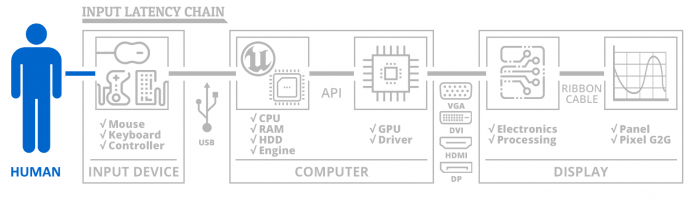
Now, in a different part of the latency chain, frametime itself is a GPU processing latency (100fps = 1/100sec for GPU to render frame). A fluctuating frame rate can mean fluctuating GPU latency (of the latency chain), which is why some players love to cap to stabilize the frame rate.
Image

There are pros/cons, because a higher framerate is lower lag, but sometimes if the framerate fluctuates too much, the frametime latency can add a latency inconsistency factor -- if you're pretrained to aim at a higher framerate or lower framerate, the changed GPU latency may mean missed shots at a different framerate due to changed frametime latency.

(100fps = 1/100sec frametime = 10ms GPU latency)
(200fps = 1/200sec frametime = 5ms GPU latency).

So with a latency yo-yo effect can affect your aiming sometimes. So seeing framerates gyrate 50fps through 300fps, you might have difficulty. So sometimes capping in the middle of your framerate fluctuation range, can stabilize the latency to be more predictable, even if your average latency is maybe a millisecond more, at least the latency is staying stable.

Different players will have different preferences on how they prefer to cap. YMMV.

Head of Blur Busters - BlurBusters.com | TestUFO.com | Follow @BlurBusters on: BlueSky | Twitter | Facebook

Image
Forum Rules wrote:  1. Rule #1: Be Nice. This is published forum rule #1. Even To Newbies & People You Disagree With!
  2. Please report rule violations If you see a post that violates forum rules, then report the post.
  3. ALWAYS respect indie testers here. See how indies are bootstrapping Blur Busters research!

braavosraider
Posts: 11
Joined: 17 Jan 2021, 23:42

Re: Top end monitor for competitive gaming?

Post by braavosraider » 28 Jan 2021, 02:08

Chief Blur Buster wrote:
27 Jan 2021, 23:01
braavosraider wrote:
27 Jan 2021, 16:27
My question is what kind of lag/latency do you refer to when the fps fluctuating (example : between 100-250 fps), as I read somewhere you said that 60 fps at 240hz has better input lag than 60 fps at 60hz?
Correct.

The faster scanout (see High Speed Videos of LCD refreshing) means 60fps at 240Hz has less lag than 60fps at 60Hz. And to complicate matters, 60fps at 60Hz on a 240Hz panel sometimes has worse latency than 60fps at 60Hz on a 60Hz panel. But 60fps at 240Hz on a 240Hz panel beats all of them (assuming same display buffering latency + GtG latency)

Now, in a different part of the latency chain, frametime itself is a GPU processing latency (100fps = 1/100sec for GPU to render frame). A fluctuating frame rate can mean fluctuating GPU latency (of the latency chain), which is why some players love to cap to stabilize the frame rate.

Image

There are pros/cons, because a higher framerate is lower lag, but sometimes if the framerate fluctuates too much, the frametime latency can add a latency inconsistency factor -- if you're pretrained to aim at a higher framerate or lower framerate, the changed GPU latency may mean missed shots at a different framerate due to changed frametime latency.

(100fps = 1/100sec frametime = 10ms GPU latency)
(200fps = 1/200sec frametime = 5ms GPU latency).

So with a latency yo-yo effect can affect your aiming sometimes. So seeing framerates gyrate 50fps through 300fps, you might have difficulty. So sometimes capping in the middle of your framerate fluctuation range, can stabilize the latency to be more predictable, even if your average latency is maybe a millisecond more, at least the latency is staying stable.

Different players will have different preferences on how they prefer to cap. YMMV.
Oh I see, I get it now Chief

that's why if player can reach stable 360fps cap it will have more advantage than the one with 240fps cap (2.78ms - 4.17ms = 1.39ms difference!) if the game itself not limiting fps. So beside mice, keyboard and monitor there's also GPU etc as significant factors which comes into play!


Another question Chief : what about OD level?
Do I have to adjust OD level to certain level to match my capped fps or not? in example for Asus VG279QM I saw on rtings the recommended OD level is 80 for max refresh rate. If I cap the fps to 120 do I have to adjust it lower or it doesn't matter?

I'm about to pull the trigger for this monitor (gonna go to nearest shop to see what text looks like on 1080p 27 inch monitor lol)


Thanks alot, Chief :)

Post Reply