ill tested already fresh windows installation with normal Installed NVIDIA Drivers. Windows Updates all clean. really bad performance.
I know a lot of Gamer can play with Standart Windows without any Tweak but i cant.
So let me Write Something its really hard to find a begin. i try to split in following Topics:
- Story
- TCP IP/Ethernet/Router/Bufferbloat
- Graphic Settings
- MSI and Affinity
- Registry
Story: I start Gaming Quake3, Unreal Tournament, Counter-Strike ( Half Life Betas when i was 12 years old in the Year 1998/1999
2003 i was Pro Gamer in Counter-Strike on ESL. I know in the Old times we tried Tweeking TCP IP Settings for getting better hit reg and also for 20 years people Say it makes no difference because most games using UDP Protocoll... we tried something like make QoS
i searching since years for any Optimizations and i tried a lot of things so im on a Points i thing less optimization is better than more ( i mean u finding a lot of Stuff)
Tweaking
Reservable Bandwidth in Windows abouit gpedit.msc
i dont use it
Graphic Settings:
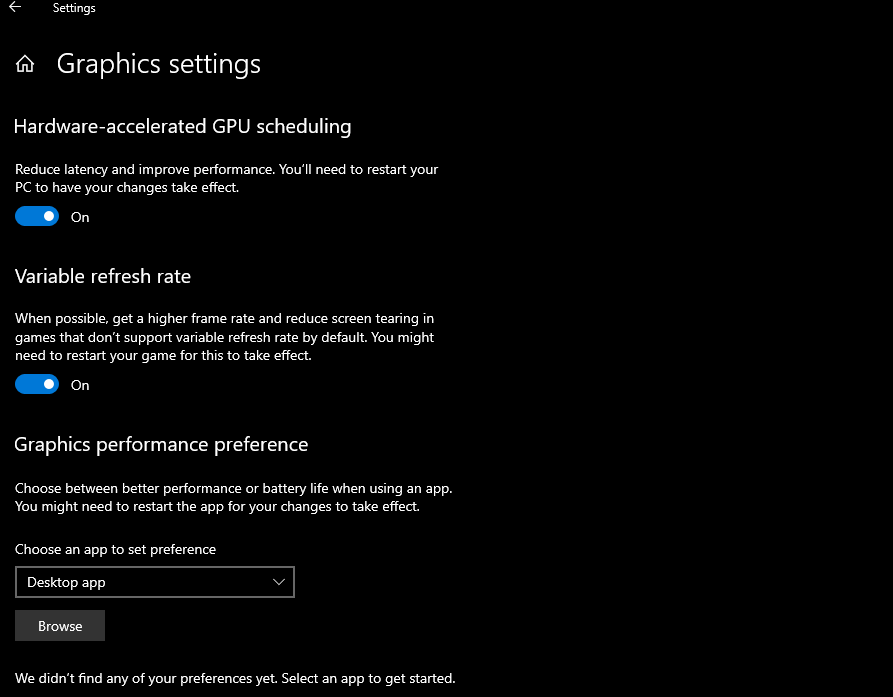
- graphics settings.png (27.24 KiB) Viewed 19529 times
ill using this because Melody and Felipe mean its good.
I dont use FortniteClient-Win64-Shipping.exe with High performance Option because i dont feel any difference and my FPS are Stable no drops.
about Nvidia Inspector Settings i found these Settings here and try i cant say is the Game smoother or not so i dont use any Nvidia Inspector Settings right now also not P2-State Off
on 2nd Site from user ffs_ he copied intresting Settings ill try this in the Past:
viewtopic.php?t=7323
About Display Scaling i didnt have it on my Nvidia control Panel Settings only GPU and i post settings in the Top of thread.
ill tried FoxOs windows 7 on my 2nd SSD Drive and intresting that there was the Display Scaling option under a older Nvidia Driver but i also feel no different.
TCP IP About Congestion Prodiver Protocoll TCP i read a lot of PDF Files from Harvard university and other stuff some mean for a Low Latency Connection use DCTCP and Hystart off with tcp set global hystart=disabled
but at the moment i play with Standart CUBIC Congestion its in Linus and under Windows 10 never versions the Standart.
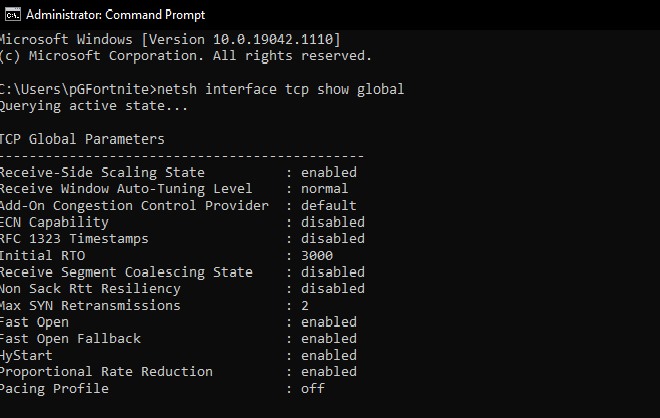
- netsh.png (19.46 KiB) Viewed 19529 times
dont change anything.
USB Drivers: my Z490 E Asus Mainboard dont have own usb Drivers only the Microsoft ones and i have really high DPC Latency with it. so i tested 12 Hours to install the Custom USB 3.1 Intel Drivers from Canonkong on Win-Raid forum.
I have Hyper Threading Disabled in Bios getting more Stable FPS with this have it since over 1 Year.
with my old i7 8700k and now with my 10850K i9 10th gen CPU.
i dont know what i can write more i read all the Tweaks from, Calypto, Melody, R0ach, Djdallmann, etc etc etc and tried think most of them. Yesterday ill tried the custom Color Management Profile was posted here in Blurbuster forum " sRGB_v4_ICC_Preference.icc" but dont find time for testing it.
i dont use any
Affinity like PCIE and GPU on a Core and the USB on a Core and Ethernet on another.. because feel no big different with it.
timer Resolution i also dont using same like bcdeit
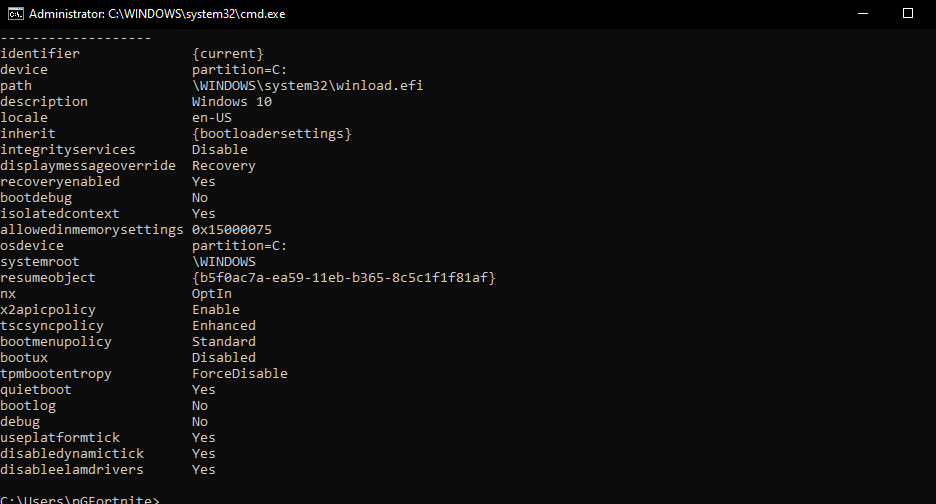
- bcdedit enum.png (22.65 KiB) Viewed 19529 times
settings
but when i checkes now bcdedit enum some settings in. Maybe Felipe make this for me its a Guy he have good Tweaking reviews and i ask him for Tweak my clean windows installation. overall all feel good but i have in Fortnite some Mouse and Keyboard input delay.. i try post Videos but forum dont let me

also ive tested in the Past most TCP IP Registry settings but also not dat big different maybe placebo.