
I always thought I intuitively understood the results from the UFO test properly, as they get presented by outlets such as Monitors Unboxed etc. But when thinking about it closely, I struggle particularly with how the camera is set up.
If you are trying to mimic how the eye perceives a moving object (on a sample-and-hold display), the camera has to move as well, right? Does it simply swivel/pan or does it have to be mounted on rails?
And what kind of framerate/shutter speed does it have to be set to?
How does the UFO test actually work?
-
kyube

- Posts: 1005
- Joined: 29 Jan 2018, 12:03
Re: How does the UFO test actually work?
This thread might help you: viewtopic.php?t=3182pegnose wrote: ↑15 Feb 2026, 16:17I always thought I intuitively understood the results from the UFO test properly, as they get presented by outlets such as Monitors Unboxed etc. But when thinking about it closely, I struggle particularly with how the camera is set up.
If you are trying to mimic how the eye perceives a moving object (on a sample-and-hold display), the camera has to move as well, right? Does it simply swivel/pan or does it have to be mounted on rails?
Yes, the TestUFO pursuit photographs test eye-tracked motion handling, which means the camera has to follow the UFO.
Read the description found @ https://testufo.com/ghosting
This is the most misleading part of the vast majority of reviewers, as they never state what settings they've used. You have to assume that they've done a good job.

Most also don't show the syncing tracks
Last edited by kyube on 15 Feb 2026, 17:26, edited 1 time in total.
evaluating xhci controller performance | audio latency discussion thread | "Why is LatencyMon not desirable to objectively measure DPC/ISR driver performance" | AM4 / AM5 system tuning considerations | latency-oriented HW considerations | “xhci hand-off” setting considerations | #1 tip for electricity-related topics | ESPORTS: Latency Perception, Temporal Ventriloquism & Horizon of Simultaneity | good lcd backlight strobing implementation list | display vs gpu scaling
-
pegnose
- Posts: 21
- Joined: 29 Dec 2018, 04:22
Re: How does the UFO test actually work?
Thanks for the information! I did ask Tim from HuB in the comments once about the shutter speed, but he probably couldn't find the time to respond.
EDIT: Awesome, I was basically right about my assumptions.
EDIT: Awesome, I was basically right about my assumptions.
-
Chief Blur Buster

- Site Admin
- Posts: 12284
- Joined: 05 Dec 2013, 15:44
- Location: Toronto / Hamilton, Ontario, Canada
- Contact:
Re: How does the UFO test actually work?
Some reviewers do a great job, and other reviewers do a poor job.
I prefer that reviewers publish the sync track.
For those wondering, use the tooltips at www.testufo.com/ghosting
Click on the labels to make the tooltips appear, to help teach you about how to do it.
They will help explain things better.
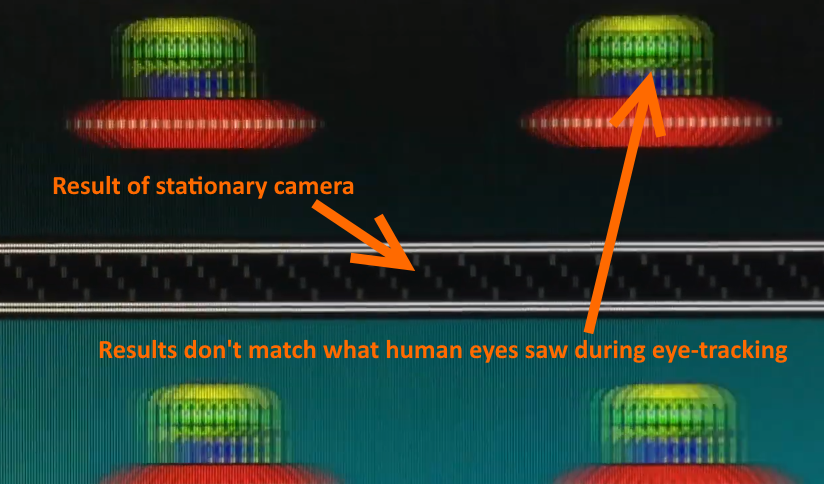
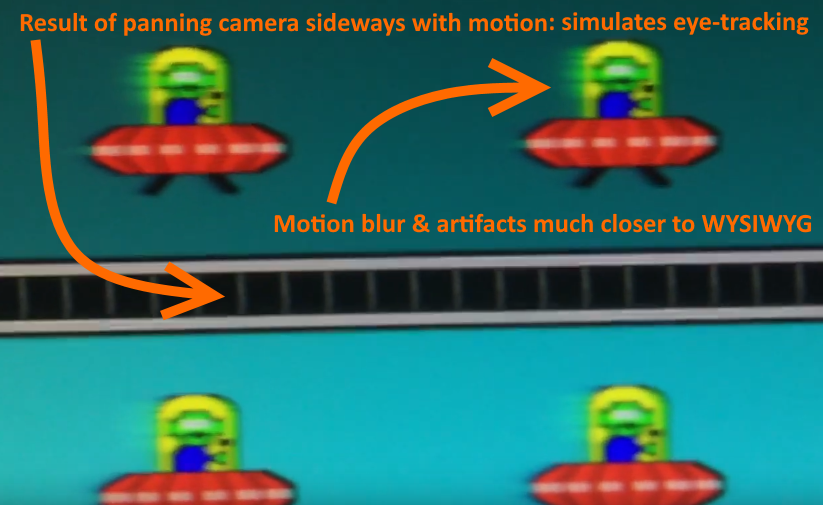
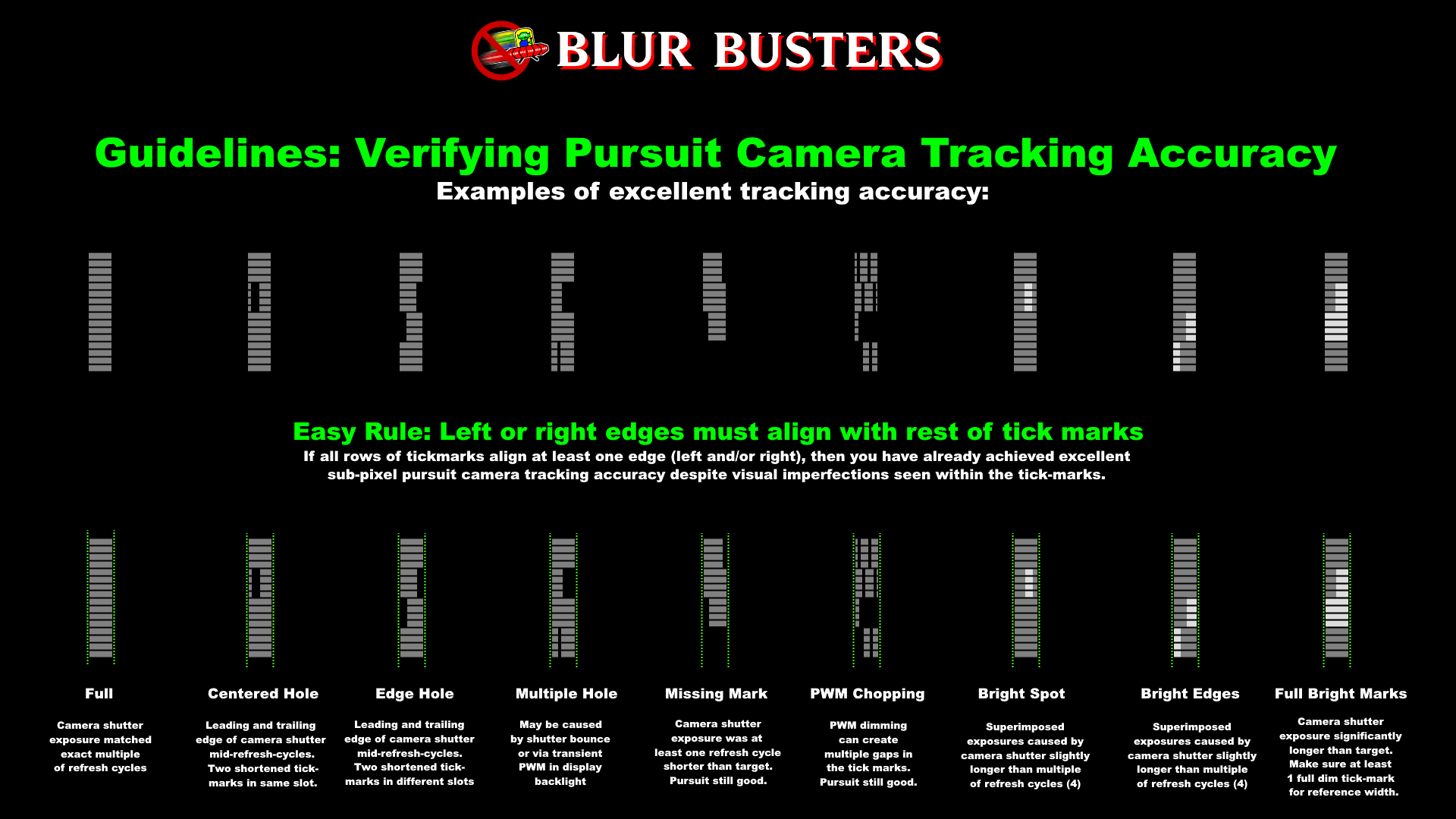
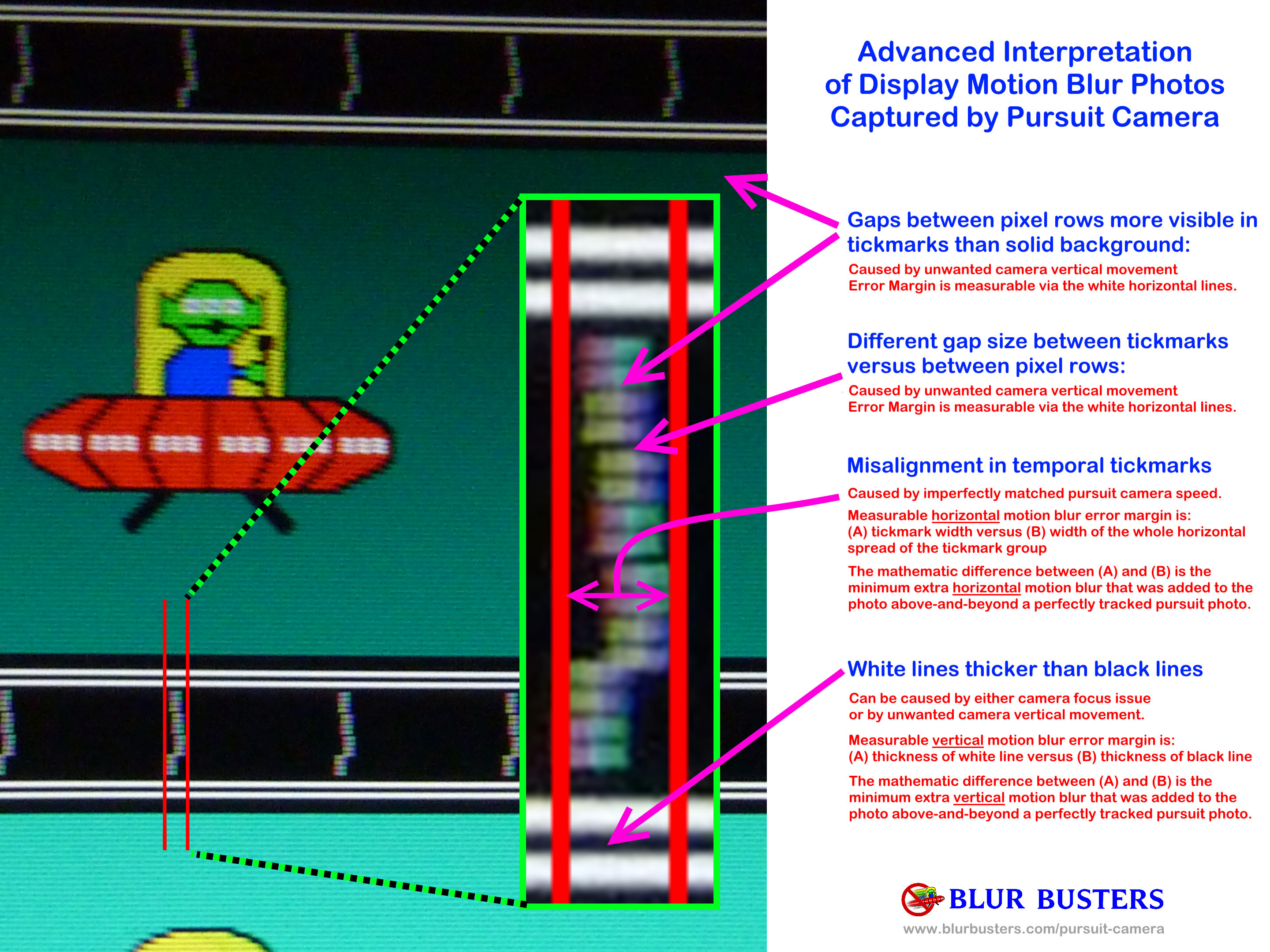


Also we have a Pursuit Camera Forum
Use a shutter speed of refresh cycle count equal to tick marks.
The sync track is the ground truth proof of accurate tracking over the camera exposure.
- Some people use camera rails
- Others people use handwave technique (video as burst shoot).
Handwave technique is now valid with good technique and an optically stabilized camera -- good for convention field tests -- I did handwave on an iPhone 14 at CES 2025 for the 480Hz OLED at www.blurbusters.com/120vs480 -- since video is like 1000 photographs (brute force) and sometimes 1 out of 1000 is clear (thanks to camera optical stabilization in high end smartphones). I used "DSLRCamera" app, fixed shutter speed to recommendation, held the phone landscape with both arms outstretched, stiff shoulders + locked elbows, and twisted using my waist to pursuit (not moving hands, but moving my waist), lens 18" from screen, pinch zoom a bit so I could see the preview clearly to aim the sync track clarity on the preview. Back and fourth about 3-4 times, then scroll through video in post-process, save clearest freezeframe. It can outperform flimsy shaky tripods for quick and dirty field tests, if you're professional at the waist-twist stiff-both-arms technique.
A slow shutter speed is intentional to simulate human vision integration time.
If pictures are sharp despite a slow-shutter moving camera, the display did a good job of blur busting so well that it avoided camera blur (despite a moving camera and slow shutter).
But the sync track has to look correct, as per standard.
It's the ground truth embedded in scientific results -- clever invention to embed tracking accuracy in the photograph -- so it doesn't care HOW you pursuited the camera (rail, wheels, slider, handwave), it TELLS you how accurately the photograph was in tracking the motion -- and that's what matters.
I have to tell you, trying to herd 1000 enthusaic content creators is like herding 1000 cats, it's not easy. So some will do it well, and some will do it poorly. But and it's indeed best that they all show the sync track. By sharing your sync track, you are boasting honesty and the truth of your tracking, so it's very good when you do show the sync track because it's the proof of accurate camera tracking.
It's a peer-reviewed invention in a conference paper, too.
I prefer that reviewers publish the sync track.
For those wondering, use the tooltips at www.testufo.com/ghosting
Click on the labels to make the tooltips appear, to help teach you about how to do it.
They will help explain things better.
- Screenshot 2026-02-15 at 5.40.56 PM.png (49.9 KiB) Viewed 13601 times
- Screenshot 2026-02-15 at 5.40.59 PM.png (122.73 KiB) Viewed 13601 times
- Screenshot 2026-02-15 at 5.41.02 PM.png (144.07 KiB) Viewed 13601 times
- Screenshot 2026-02-15 at 5.41.05 PM.png (57.96 KiB) Viewed 13601 times
- Screenshot 2026-02-15 at 5.41.10 PM.png (1.03 KiB) Viewed 13601 times
- Screenshot 2026-02-15 at 5.40.52 PM.png (121.71 KiB) Viewed 13601 times
- Screenshot 2026-02-15 at 5.43.23 PM.png (41.59 KiB) Viewed 13600 times
Also we have a Pursuit Camera Forum
Use a shutter speed of refresh cycle count equal to tick marks.
The sync track is the ground truth proof of accurate tracking over the camera exposure.
- Some people use camera rails
- Others people use handwave technique (video as burst shoot).
Handwave technique is now valid with good technique and an optically stabilized camera -- good for convention field tests -- I did handwave on an iPhone 14 at CES 2025 for the 480Hz OLED at www.blurbusters.com/120vs480 -- since video is like 1000 photographs (brute force) and sometimes 1 out of 1000 is clear (thanks to camera optical stabilization in high end smartphones). I used "DSLRCamera" app, fixed shutter speed to recommendation, held the phone landscape with both arms outstretched, stiff shoulders + locked elbows, and twisted using my waist to pursuit (not moving hands, but moving my waist), lens 18" from screen, pinch zoom a bit so I could see the preview clearly to aim the sync track clarity on the preview. Back and fourth about 3-4 times, then scroll through video in post-process, save clearest freezeframe. It can outperform flimsy shaky tripods for quick and dirty field tests, if you're professional at the waist-twist stiff-both-arms technique.
A slow shutter speed is intentional to simulate human vision integration time.
If pictures are sharp despite a slow-shutter moving camera, the display did a good job of blur busting so well that it avoided camera blur (despite a moving camera and slow shutter).
But the sync track has to look correct, as per standard.
It's the ground truth embedded in scientific results -- clever invention to embed tracking accuracy in the photograph -- so it doesn't care HOW you pursuited the camera (rail, wheels, slider, handwave), it TELLS you how accurately the photograph was in tracking the motion -- and that's what matters.
I have to tell you, trying to herd 1000 enthusaic content creators is like herding 1000 cats, it's not easy. So some will do it well, and some will do it poorly. But and it's indeed best that they all show the sync track. By sharing your sync track, you are boasting honesty and the truth of your tracking, so it's very good when you do show the sync track because it's the proof of accurate camera tracking.
It's a peer-reviewed invention in a conference paper, too.
Head of Blur Busters - BlurBusters.com | TestUFO.com | Follow @BlurBusters on: BlueSky | Twitter | Facebook

Forum Rules wrote: 1. Rule #1: Be Nice. This is published forum rule #1. Even To Newbies & People You Disagree With!
2. Please report rule violations If you see a post that violates forum rules, then report the post.
3. ALWAYS respect indie testers here. See how indies are bootstrapping Blur Busters research!
-
pegnose
- Posts: 21
- Joined: 29 Dec 2018, 04:22
Re: How does the UFO test actually work?
Awesome, thank you!
So the sync track statically viewed is a diagonal of blocks. They "become" a vertical line (ideally) because relative to the moving image they are shown at the same horizontal position?
So the sync track statically viewed is a diagonal of blocks. They "become" a vertical line (ideally) because relative to the moving image they are shown at the same horizontal position?
-
Chief Blur Buster
- Site Admin
- Posts: 12284
- Joined: 05 Dec 2013, 15:44
- Location: Toronto / Hamilton, Ontario, Canada
- Contact:
Re: How does the UFO test actually work?
Correct. This is a clever invention. It only becomes vertical lines for moving eyeballs or moving camera lens.
Whatever is "seeing" (a human eye or a correctly configured camera) will see the same vertical lines when tracking is accurate.
Moving eyeball = moving lens on a slow-exposure camera = produces same motion blur result.
Motion blur is the aggregate effect caused by sample-and-hold, which is explained in the RTINGs video too:
It's the ground truth proof of accurate tracking. If the sync track is accurate, it guarantees the camera moved, whether on a camera rail, or via a smartphone handwave (both valid) -- as long as the sync track is accurate, the sync track doesn't care HOW the camera was tracked; just that it confirms the camera moved in sync with the motion. The more accurate the sync track looks, the more accurate the camera moved (regardless of camera move)
- manual swivel cameras
- manual rails
- motorized swivel cameras
- motorized rails
- smartphone handwave
Yes, it is amazing that handwave actually performs surprisingly unexpectedly well, like what I did for the 480 Hz OLED. Thanks to the existence of doing a freezeframe from high-quality video (1000 video frames = 1000 photography attempts) plus help from smartphone automatic optical stabilization, plus help with human technique using stiff locked arms+elbows+shoulders + spin computer chair or twist waist + manual-custom-adjustments (SLR-like) camera app instead of apple/google camera app.
Head of Blur Busters - BlurBusters.com | TestUFO.com | Follow @BlurBusters on: BlueSky | Twitter | Facebook
Forum Rules wrote: 1. Rule #1: Be Nice. This is published forum rule #1. Even To Newbies & People You Disagree With!
2. Please report rule violations If you see a post that violates forum rules, then report the post.
3. ALWAYS respect indie testers here. See how indies are bootstrapping Blur Busters research!
-
pegnose
- Posts: 21
- Joined: 29 Dec 2018, 04:22
Re: How does the UFO test actually work?
Awesome, thanks for the further explanation!