NVIDIA G-Sync Pulsar monitor - Asus ROG Strix XG27AQNGV

Ask about motion blur reduction in gaming monitors. Includes ULMB (Ultra Low Motion Blur), NVIDIA LightBoost, ASUS ELMB, BenQ/Zowie DyAc, ToastyX, black frame insertion (BFI), and now framerate-based motion blur reduction (framegen / LSS / etc).
styhk
Posts: 13
Joined: 23 May 2022, 16:55

Re: NVIDIA G-Sync Pulsar monitor - Asus ROG Strix XG27AQNGV

Post by styhk » 19 Dec 2025, 06:50

Chief Blur Buster wrote:
19 Dec 2025, 04:23
styhk wrote:
19 Dec 2025, 03:03
Kinda disappointed with the refresh rate, We should be getting at least 500Hz in 2026.
I could only imagine how clear it would look like:(
Unstrobed, 1000Hz OLED will definitely beat any unstrobed LCD

But this baby is strobed. Hz doesn't improve motion clarity of strobing. Motion clarity is dictated by pulsewidth. 360Hz ULMB does look clearer motion than an unstrobed 1000Hz OLED.

In fact, 500Hz strobing is worse than 360Hz strobing because of the refresh rate headroom trick to hide LCD GtG in the VBI. Discorz eloquently explains why lowering Hz sometimes improves strobing at www.blurbusters.com/xg2431-discorz because LCD GtG is too slow to avoid strobe crosstalk at a higher Hz.

So it's just a game of pick-poison compromises, but "how clear it would look like" isn't going to happen with a higher Hz strobed LCD, when the calculus for stroberate=refreshrate=framerate favours a Goldilocks Hz (not too high and not too low) when combined with low strobe crosstalk (Hz low enough to hide LCD GtG pixel response in total darkness between strobe flashes).
https://tftcentral.co.uk/wp-content/upl ... _1_new.png
Ultra Fast IPS panels can do average 2.2ms GtG with most ranges within 2ms, shouldn't that be enough for 500Hz?
With those newer backlight which has LED strip on both sides, I assume there would be barely any crosstalk?

styhk
Posts: 13
Joined: 23 May 2022, 16:55

Re: NVIDIA G-Sync Pulsar monitor - Asus ROG Strix XG27AQNGV

Post by styhk » 19 Dec 2025, 07:04

Smoothness and motion clarity are totally different.

My understanding:
Smoothness = how coherence motion looks, higher refresh rate always look smoother even GtG is slow

Motion clarity = How clear it looks when flicking around

Human eyes doesn't work exactly like a camera that's why I think people are too serious about UFO test.

LCD's motion clarity are slighty better at lower refresh rate due to OLED's judder effect.

At 360Hz+ OLED just win no matters what.

I have way better experience on 360Hz OLED compared to 540Hz strobbed ULMB2 LCD.

Input lag is lower due to extremely low GtG and motion clarity is better probably because of the glossy coating, no ghosting, double imaging bs.

I'm happy with my Philips 500Hz QD-OLED, Hopefully there will be 1080p high refresh rate OLED next year

I would've bought the ASUS 2K Dual mode 540/720Hz but 720Hz only works at 720p so it' basically useless. I thought 720Hz would work at 1080p, What a disappointment.

User avatar
kyube
Posts: 588
Joined: 29 Jan 2018, 12:03

Re: NVIDIA G-Sync Pulsar monitor - Asus ROG Strix XG27AQNGV

Post by kyube » 19 Dec 2025, 08:47

styhk wrote:
19 Dec 2025, 06:50
https://tftcentral.co.uk/wp-content/upl ... _1_new.png
Ultra Fast IPS panels can do average 2.2ms GtG with most ranges within 2ms, shouldn't that be enough for 500Hz?
With those newer backlight which has LED strip on both sides, I assume there would be barely any crosstalk?
1.) Extremely far from it :)
The PG27AQN ("Ultra Fast IPS")'s M270DAN10.0 is only compliant ("OLED-like") at it's 240Hz setting. It falls apart once you get into it's 360Hz mode.
There isn't a single LCD display which has the necessary G2G < MPRT target requirement for "truthful" refresh rate representation.

2.) The "LED strips both sides" refers to manifacturers' implenting a rolling scan backlight strobing solution as opposed to a global scan backlight strobing solution
Found on panels such as on TNs' (Dyac2, ELMB2, MBR+) or on certain IPS MiniLED's (e.g.: MSI 4K model, E16M)
styhk wrote:
19 Dec 2025, 07:04
Smoothness and motion clarity are totally different.
My understanding:
Smoothness = how coherence motion looks, higher refresh rate always look smoother even GtG is slow
Motion clarity = How clear it looks when flicking around
This is why these ambigious terms are misleading :)
In terms of eye-tracked motion performance (part of a umbrella term I've personally chosen — "dynamic image quality", which encompasses both fixed-gaze & eye-tracked scenarios), it's highly dependant on the speed of the digital object moving on-screen.
"Smoothness" is a term used coloquially to describe sample rate. :)

styhk wrote:
19 Dec 2025, 07:04
Human eyes doesn't work exactly like a camera that's why I think people are too serious about UFO test.
This is a somewhat misleading claim.
Human eyes in fast-paced esports games (Apex, Rocket League, OW2, Quake, racing games), especially in games with a locked frame rate benefit tremendously from eye-tracked motion performance.
This is the whole purpose of the TestUFO pursuit photographs... testing that particular part of the dynamic image quality of a display.
I do agree that the particular G2G values that TestUFO uses may not be representative of how the panel will "feel" or "look like" in-game, as LCD's can be either good at rise times (IPS) or fall times (TN) or have both somewhat equally well done (VA's such as the INNOCN 27G1S)
It's foolish to claim that TestUFO results shouldn't be taken seriously, as they can reveal a lot about a panel's characteristics without resorting to the use of probing the internals of a display using external tools (oscilloscope + light probe) when done at correct UFO speeds.

styhk wrote:
19 Dec 2025, 07:04
LCD's motion clarity are slighty better at lower refresh rate due to OLED's judder effect.
"Slightly better at lower refresh rate"?
What? Better at doing what? Displaying a digital image on a electronic visual display?
No. OLED is the only truthful representation
The "judder effect" is caused by the too low sample/refresh rate of the content & therefore the screen as well (as this entire discussion assumes frame rates being equal or higher than the display's refresh rate/vertical frequency)
styhk wrote:
19 Dec 2025, 07:04
At 360Hz+ OLED just win no matters what.
"Wins" at what?
Sample & hold representation of the refresh rate when FPS>=Hz? Yes.
Eye-tracked motion performance in the vast majority of games/workloads when FPS=Hz? Very insufficient, considering that 360px/s is very slow
"Good" backlight strobing (<1ms MPRT) still has a valid place, especially in 100-240Hz range where the vast majority of games are played in nowadays.
styhk wrote:
19 Dec 2025, 07:04
I have way better experience on 360Hz OLED compared to 540Hz strobbed ULMB2 LCD.
Input lag is lower due to extremely low GtG and motion clarity is better probably because of the glossy coating, no ghosting, double imaging bs.
Yes, generally, backlight strobing is somewhat of a hinderance from a physiological perspective (due to flicker), the added processing latency & use of KSF WLED backlight (on your particular model)
Sample & hold, if you're satisfied with / ignorant of the "smear" (due to the relatively low frame rate target of 360), on OLED is better.
styhk wrote:
19 Dec 2025, 07:04
I'm happy with my Philips 500Hz QD-OLED, Hopefully there will be 1080p high refresh rate OLED next year
I would've bought the ASUS 2K Dual mode 540/720Hz but 720Hz only works at 720p so it' basically useless. I thought 720Hz would work at 1080p, What a disappointment.
You can set your image resolution to 1080p and rely on 'No scaling' to achieve the desired viewport while playing.


User avatar
Chief Blur Buster
Site Admin
Posts: 12139
Joined: 05 Dec 2013, 15:44
Location: Toronto / Hamilton, Ontario, Canada
Contact:

Re: NVIDIA G-Sync Pulsar monitor - Asus ROG Strix XG27AQNGV

Post by Chief Blur Buster » 19 Dec 2025, 16:28

styhk wrote:
19 Dec 2025, 06:50
Ultra Fast IPS panels can do average 2.2ms GtG with most ranges within 2ms, shouldn't that be enough for 500Hz?
With those newer backlight which has LED strip on both sides, I assume there would be barely any crosstalk?
Things don't work that way.

or now, I humbly suggest some homework at www.blurbusters.com/area51

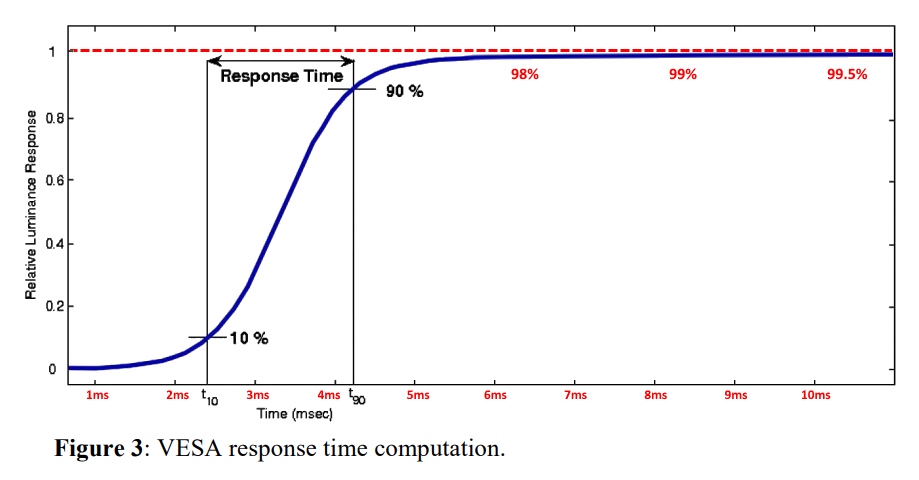
TL;DR: LCD GtG needs to be 0.000. Not a fraction of a Hz. Perfect zero. I can still see 1-2ms GtG at 120Hz as that adds ~25% more blur to the 1/120sec. GtG is like a slow moving camera shutter. Also, remember GtG is a curve. 1ms GtG can be 10ms+ GtG!

The numbers you see in articles is ONLY a fraction of the curve.

Image
Head of Blur Busters - BlurBusters.com | TestUFO.com | Follow @BlurBusters on: BlueSky | Twitter | Facebook

Image
Forum Rules wrote:  1. Rule #1: Be Nice. This is published forum rule #1. Even To Newbies & People You Disagree With!
  2. Please report rule violations If you see a post that violates forum rules, then report the post.
  3. ALWAYS respect indie testers here. See how indies are bootstrapping Blur Busters research!

User avatar
Discorz
VIP Member
Posts: 1098
Joined: 06 Sep 2019, 02:39
Location: Europe, Croatia
Contact:

Re: NVIDIA G-Sync Pulsar monitor - Asus ROG Strix XG27AQNGV

Post by Discorz » 20 Dec 2025, 04:26

styhk wrote:
19 Dec 2025, 03:03
Kinda disappointed with the refresh rate, We should be getting at least 500Hz in 2026.
I could only imagine how clear it would look like:(

There are dual mode 2K 500Hz/1000Hz LCD coming next year.
Battle between smoothness vs motion clarity
1440p LCDs have been stuck at 360 Hz for almost 3 years now. But they're cooking something. It's been about 2 years since they first showcased 27" QHD 500Hz IPS panels. None of them saw the light of the day yet. These are the LCDs I'm aware of.
  • MSI 272QPX
  • Acer XV270U F5
  • Philips 27M2N5500XD
  • AOC AGP277QK

styhk
Posts: 13
Joined: 23 May 2022, 16:55

Re: NVIDIA G-Sync Pulsar monitor - Asus ROG Strix XG27AQNGV

Post by styhk » Yesterday, 11:33

Discorz wrote:
20 Dec 2025, 04:26
styhk wrote:
19 Dec 2025, 03:03
Kinda disappointed with the refresh rate, We should be getting at least 500Hz in 2026.
I could only imagine how clear it would look like:(

There are dual mode 2K 500Hz/1000Hz LCD coming next year.
Battle between smoothness vs motion clarity
1440p LCDs have been stuck at 360 Hz for almost 3 years now. But they're cooking something. It's been about 2 years since they first showcased 27" QHD 500Hz IPS panels. None of them saw the light of the day yet. These are the LCDs I'm aware of.
  • MSI 272QPX
  • Acer XV270U F5
  • Philips 27M2N5500XD
  • AOC AGP277QK
They have been selling 2K 400Hz and 500Hz LCD for more than one year in China, from brand like HKC and AOC etc... and they cost around Less than US$300

User avatar
Chief Blur Buster
Site Admin
Posts: 12139
Joined: 05 Dec 2013, 15:44
Location: Toronto / Hamilton, Ontario, Canada
Contact:

Re: NVIDIA G-Sync Pulsar monitor - Asus ROG Strix XG27AQNGV

Post by Chief Blur Buster » Today, 12:16

styhk wrote:
19 Dec 2025, 07:04
Human eyes doesn't work exactly like a camera that's why I think people are too serious about UFO test.
Correct. Exactly.

But there ARE ways to adjust a camera to emulate a human eye better, as explained in the instructions/tooltips at www.testufo.com/ghosting (click on "Pursuit Camera Sync Track" and read the info on smartphone handwave trick) -- I also have a research paper at www.blurbusters.com/motion-test/pursuit-camera-paper

Be noted, screens behave differently for stationary eye vs moving eye. Stare at the two UFOs at www.testufo.com/eyetracking and www.testufo.com/persistence <-- One of the most educational animations about eye-tracking. (And if you test a camera configured to a 1/30sec shutter, and wave the camera on these tests very carefully -- you instantly realize you can 'mostly' capture what you saw on camera -- showing a stationary camera vs moving camera produces an approximate equivalence to the said stationary eyeball vs moving eyeball -- when practicing on these specific TestUFO's. It's shockingly eduational how bad cameras are and how good cameras are, and it's also all about technique too).

That's why it's important to correctly capture motion blur, a moving camera with a long exposure (to simulate human eye averaging time), simulates a moving eyeball hundreds of times more accurately than the average photograph. Many people misunderstand the need to have motion equivalence between the natural & artifical lens, plus settings on the camera to more closely emulate the human eyeball. This is well-researched.

Obviously it does not capture other dynamic effects like VSYNC OFF, tearing, jitter/stutters, etc. It will always look different. But for a framerate=Hz situation (ideal), with smooth motion, you can have pretty good equivalence between a moving eyeball & a moving camera -- as you've noticed (after 15 minutes of studying the animations and practicing with custom camera settings as per research paper).

Obviously, there's limitations on what cameras can do in capturing things like stutter. Games do not always do framerate=Hz with smooth motion unless you intentionally configure them (e.g. VSYNC ON), which not everybody does.

Tip: Use high-poll, high-dpi, low-sens gaming mouse, to make mouselook's TestUFO-smooth which is an optimization that some gamers do as well, if they are able to do framerate=Hz in games.
Head of Blur Busters - BlurBusters.com | TestUFO.com | Follow @BlurBusters on: BlueSky | Twitter | Facebook

Image
Forum Rules wrote:  1. Rule #1: Be Nice. This is published forum rule #1. Even To Newbies & People You Disagree With!
  2. Please report rule violations If you see a post that violates forum rules, then report the post.
  3. ALWAYS respect indie testers here. See how indies are bootstrapping Blur Busters research!

Post Reply