NVIDIA G-Sync Pulsar monitor - Asus ROG Strix XG27AQNGV

Ask about motion blur reduction in gaming monitors. Includes ULMB (Ultra Low Motion Blur), NVIDIA LightBoost, ASUS ELMB, BenQ/Zowie DyAc, ToastyX, black frame insertion (BFI), and now framerate-based motion blur reduction (framegen / LSS / etc).
Post Reply
User avatar
kyube
Posts: 934
Joined: 29 Jan 2018, 12:03

Re: NVIDIA G-Sync Pulsar monitor - Asus ROG Strix XG27AQNGV

Post by kyube » 23 Apr 2026, 09:43

brownvim wrote:
23 Apr 2026, 08:36
Update: just seen a new review that shows the MSI version only does 128 nits in the 60hz mode https://www.displayninja.com/msi-mpg-272qrf-x36-review/
I personally find 100-150 cd/m² to be great in-doors.
It's impossible to achieve good clarity @ 60 Hz (~16,67 ms) otherwise, even with the 1700–2000 cd/m² voltage boosting.
Funnily enough, that review seems to confirm the findings of another user here, that they've chosen a fixed PW target on the MSI model for some reason... even more artificial limitations.
It should be ~6–7.5% duty cycle. To be specific: ~1,066–1,25 ms strobe 'on' period
Very mediocre performance compared to a CRT at the same refresh rate, if true.

According to TFTcentral data, which claims:
PW 100 50 10
Max luminance (nits) 454 245 50
The PW=50 setting gets you 2,0416667075 – 2,40196 ms (“Effective refresh rate of ~489,8–416,32 Hz”)
The PW=10 setting gets you 0,4166666675 – 0,490196 ms, which is the closest thing to a CRT at this refresh rate. (“Effective refresh rate of ~2400–2040 Hz)

Which means that the only "usable" mode (in my eyes) on the 60Hz ULMB2 feature is the “PW=10” setting (On the Acer & ASUS)
“Usable”, in the sense of the clarity it targets.
However, the following traits:
• Extreme light flicker,
• low brightness,
• high total display latency
• Too low of a sample/refresh rate (enhanced stroboscopic & phantom array effects)
make it unusable from a realistic perspective.

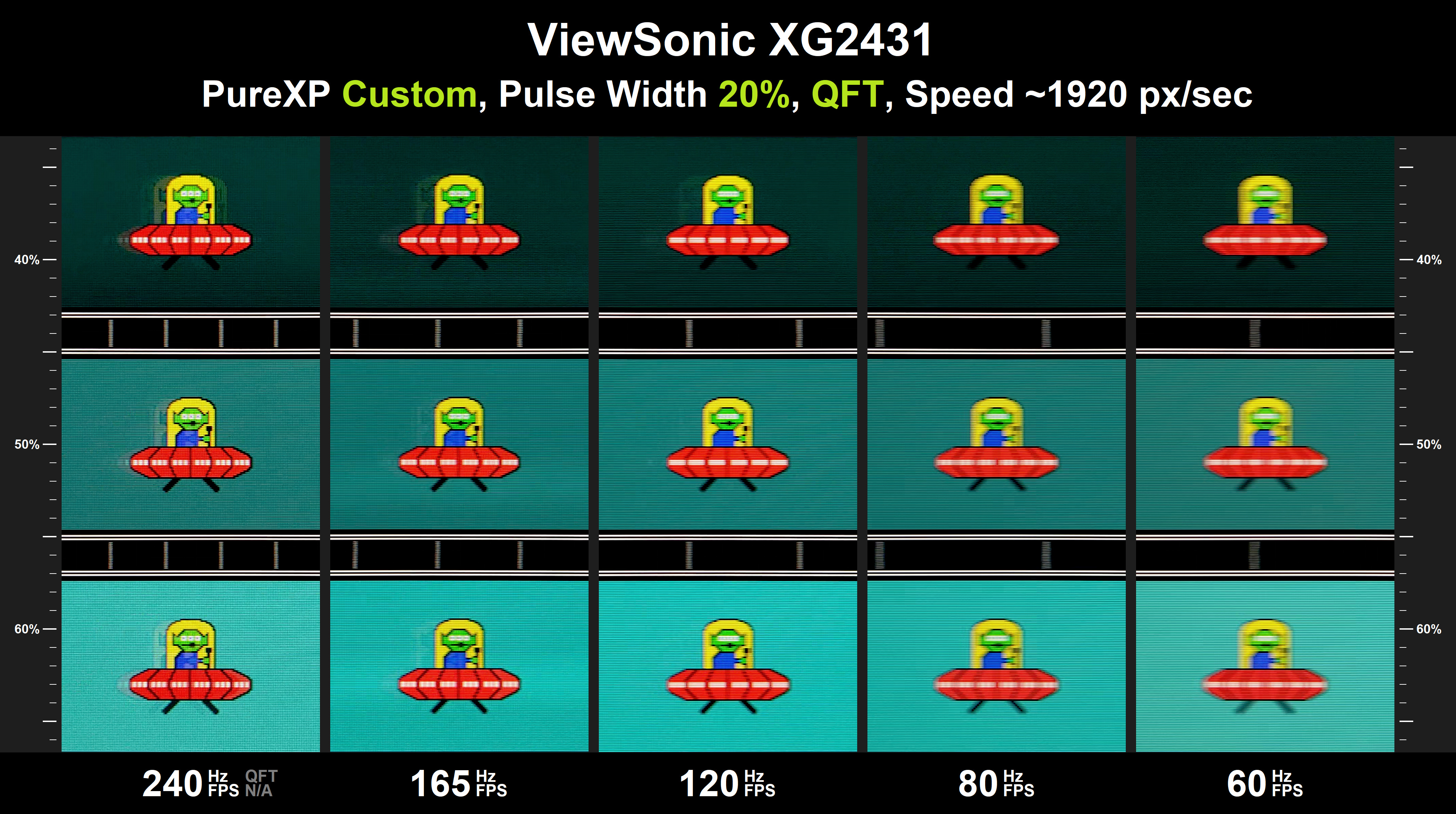
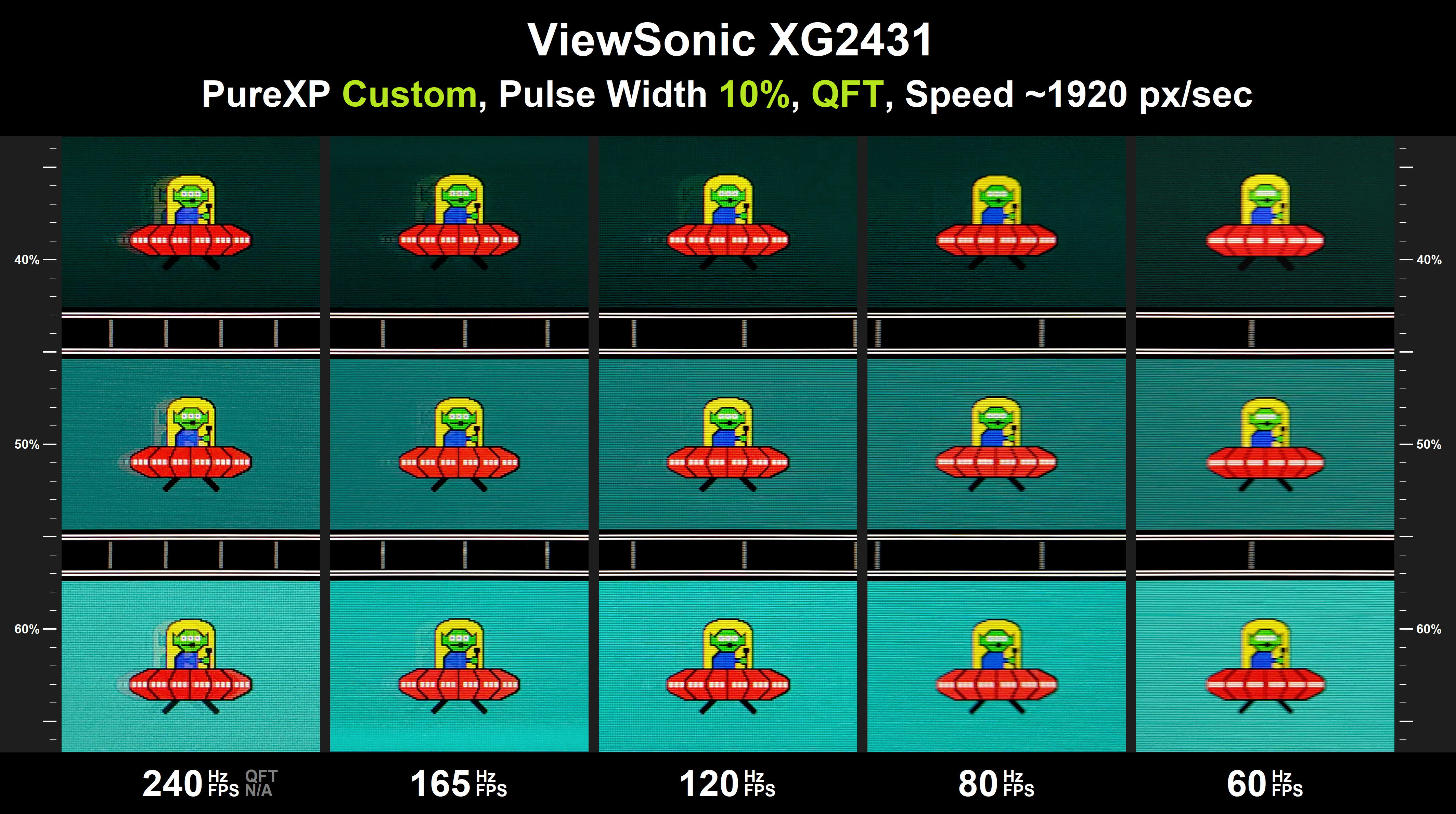
120,240,360Hz with ULMB2 PW=10 should've made hitting <0,5ms effortless, as the higher refresh rate enables you to push higher brightness.
A example of that can be found in Discorz' XG2431 review
Image
Image

In comparison to the only other IPS LCD with 60Hz strobing on the market (with a much lower brightness voltage boosting)
Note: this data is a extrapolation of Discorz, it isn't measured with a oscilloscope + probe and/or similar equipment
Image

You'd need at least a PW=5 to achieve a <0,8 ms strobe 'on' period.

Yes, the XG27AQNGV / XB273U F5 beat the XG2431 with no sweat, due to the much larger brightness voltage boosting.
However, it's far away from a CRT, which is the benchmark of <100Hz strobing.

I don't have exact data on the XL2411P & older 120-144Hz era BenQ models, which were capable of 60–100Hz strobing without double-imaging, but I doubt it had the voltage boosting capabilities of +1700 cd/m² of later DyAc models.

brownvim
Posts: 228
Joined: 22 Jun 2020, 04:15

Re: NVIDIA G-Sync Pulsar monitor - Asus ROG Strix XG27AQNGV

Post by brownvim » 23 Apr 2026, 10:11

kyube wrote:
23 Apr 2026, 09:43
Which means that the only "usable" mode (in my eyes) on the 60Hz ULMB2 feature is the “PW=10” setting (On the Acer & ASUS)
“Usable”, in the sense of the clarity it targets.
However, the following traits:
• Extreme light flicker,
• low brightness,
• high total display latency
• Too low of a sample/refresh rate (enhanced stroboscopic & phantom array effects)
make it unusable from a realistic perspective.
For most people who play at 60hz I think the Acer and Asus will be great, I guess its not for you as you have some extreme standards.

On the Acer I can play my Switch 2 and PS5 pro at 50 PW which gives me 277nits, with an effective frame rate of 400-500fps.

That’s an excellent real-world balance for most people — bright enough to actually use while still delivering very strong motion clarity.

Most gamers care about usable brightness + very good clarity, not chasing the absolute theoretical maximum at the cost of making the screen too dark to enjoy.
Last edited by brownvim on 23 Apr 2026, 10:22, edited 1 time in total.
5800X3D, RTX 5080 FE, OLED AW3423DW + Acer Pulsar XB273U F5

MSIfanboy
Posts: 174
Joined: 15 Apr 2022, 13:51

Re: NVIDIA G-Sync Pulsar monitor - Asus ROG Strix XG27AQNGV

Post by MSIfanboy » 23 Apr 2026, 10:21

phpBB [video]

User avatar
CriticalHit_NL
Posts: 19
Joined: 22 Apr 2026, 16:34

Re: NVIDIA G-Sync Pulsar monitor - Asus ROG Strix XG27AQNGV

Post by CriticalHit_NL » 23 Apr 2026, 10:32

brownvim wrote:
23 Apr 2026, 08:36
On the 10-bit colour thing, it made the Nvidia control panel look pink, so I switched back to 8-bit. I'm not sure if the colours are correct? it looks very different to my OLED thats next to it.
Seems fine on my end, the color format is also set to RGB in the Nvidia Control Panel with dynamic color range set to full.

On the panel itself in the OSD the 'Racing mode' preset is configured as I personally just liked that the most.
Furthermore the colour temperature is just forced to RGB mode with 100/100/100 for RGB, I left Gamma at the default 2.2.
All the adaptive things are disabled as well.

However on the desktop I keep HDR mode disabled, Windows 10 I believe handles HDR also a little bit differently than Windows 11 and it could be that something weird happens here, although HDR mode is just generally a bit more dim on the desktop but that appears to be normal behavior. (I never used HDR before this so I'm learning as we go on that subject)

Did you also try it on lower refreshrates to see if it could be some kind of bandwidth issue with the cable?
I am not sure if you use the supplied cable (which should be fine) or something different.
Personally I don't know if DSC on DP 1.4 videocards could potentially have this issue more often as they use two display pipelines for DSC to function to my understanding.

There are also some reports I see about Windows 11 242H2 introducing odd bugs with 10-bit mode.
Sometimes disabling G-sync might help but I don't know if that is still something that happens on 25H2.

But hopefully you will find your answer.
brownvim wrote:
23 Apr 2026, 08:36
Its so good at 200–300+ FPS, even with MFG although i find MFG makes the image softer? I tried Pragmata the other day with path tracing + MFG and it looked incredible, Capcom’s engine just feels buttery smooth with consistent frame times.
It could be possible that it could be observed as slightly softer, in motion MFG can have some inconsistencies in image output so I can definitely see it sometimes 'mismatching' causing to fuzzyness in motion but don't quote me on that, generally though it works pretty impressively for what it is.

But you definitely should be seeing the sharpest picture in raw raster rendering performance if you can reach it, I tried it on a title like Call of Duty 2 and with 333-fps lock it feels like such a godsend this monitor, so clear and so smooth.

I'll add though that during my testing with Smooth Frog in 2D Frog Pursuit with 15 panning speed I figured that I don't want to cap beyond 335 fps in Rivatuner (reflex mode) as I noticed v-sync tearing problems whenever it was in the 340-357 range especially at the bottom part of the monitor, increasingly getting worse as the fps was increased closer to the 360hz limit. All makes sense that V-sync limits it to 327fps but I found out that without V-sync 335 was pretty much perfect to my experience.
brownvim wrote:
23 Apr 2026, 08:36
Big thanks to Baddass on the Overclockers forums — he’s the one who listened and relayed the ghosting issue to NVIDIA, and I think he’s a big reason why they’ve started engaging in this thread. I mentioned we needed a better way to pass feedback on, and it seems like it worked.
Happy to see it. :D
brownvim wrote:
23 Apr 2026, 08:36
I completely agree the motion clarity is addictive. It’s genuinely hard going back to my OLED now — even with MFG, the inconsistency and occasional stutter in some games makes me appreciate Pulsar even more at lower frame rates. Sometimes it really does come down to how well the game is frame-paced.
Yep, sometimes I turn off Pulsar at 300 fps just to look at the difference and to me the difference was still pretty vast, it's just so much easier on the eyes, your brain is less trying to compensate for the sample & hold blur trying to track objects and this technology makes that such a blessing.

Now I have never used the other types of strobing-tech of other brands but I am very happy with Pulsar and its set & forget nature and capability to allow VRR to still function because I just love VRR and would have been kind of a dealbreaker otherwise, and for games that have a FPS-cap e.g. 50 I can just use LSFG to push it towards my FPS target and I must say in the more simple rendered titles that works pretty well with minimal visual issues yet benefit from the sweet Pulsar clarity.

For me the price for having this kind of tech has been pretty acceptable, also knowing the PG279Q used to cost me 150,- more 10 years ago. But remains to be seen how long the PG279Q remains functional as it won't turn on when I turn off the AC power unless I replug the plug on the monitor side. Sometimes it would work again replugging the power adapter, but it refuses. Tried an identical brand new replacement from Amazon and same thing so it is something internally, maybe capacitors or something, this tends to be something common with quite some monitors if I have to believe the reports online accross various models even of other brands. But with likely over 40-45K burning hours I think it's done well always in OC 165Hz mode. :)
Main System:
i9 13900K @ 0.06v undervolt 0x10B microcode / 128GB (4x32GB) Corsair Dominator Platinum RGB DDR5-5400 CL40 XMP / Asus ROG Maximus Z790 Extreme (early 0219 bios, Sept 2022) / Asus ROG Astral RTX 5090 OC / 2x 990 Pro 4TB / 3x WDC Ultrastar HC590 DC 24TB / 3x HGST He10 Ultrastar 8TB / 1x HGST 7K4000 Deskstar 4TB / Corsair iCUE H170i Elite Capellix LCD 420mm AIO (6x Noctua NF-A14 IndustrialPPC 3000RPM) / Corsair AX1600i PSU (2025) / CoolerMaster HAF 700 EVO / Asus ROG Strix Pulsar XG27AQNGV 1440P 360Hz / Asus ROG Swift PG279Q 1440P 165Hz / BenQ BL2411PT 1200P 60Hz

Secondary System:
i7 3930K @ 4.8Ghz 1.4v / 32GB (8x4GB) Corsair Dominator DDR3-1866 CL9 XMP 1T / Asus Sabertooth X79 (2012 bios 3102) / EVGA GTX1080Ti FTW3 / 1x 840 Pro 256GB / 1x 860 Pro 2TB / 2x HGST 7K4000 Deskstar 4TB / Corsair iCUE H115i RGB Elite 280mm AIO (stock fans in pull) / Corsair AX1200i PSU (2014) / CoolerMaster HAF XM

Third System:
i7 950 @ 3.2Ghz turbo / 24GB (6x4GB) Corsair Dominator/Vengeance DDR3-1600 CL9 XMP / Asus P6T Deluxe V1 X58 / Asus ProArt RTX 4060 8GB / 1x 840 Pro 256GB / 1x WD Blue 1TB / Corsair HX750i PSU / CoolerMaster V6-GT CPU-cooler / CoolerMaster HAF 922

Fourth System:
Core 2 Quad Q9550 @ 2.91Ghz / 8GB (2x4GB) DDR3-1066 @ 1098 Royemai (SK-Hynix) / Gigabyte GA-G41M-Combo (Rev. 2.0) @ 343 FSB / EVGA GTX 560 SuperClocked 1GB / 1x860 EVO 500GB / 1x Samsung HD502HI 500GB / Artic Freezer 7 Pro Rev 2.0 / Corsair HX750i PSU / CoolerMaster Elite 331

User avatar
kyube
Posts: 934
Joined: 29 Jan 2018, 12:03

Re: NVIDIA G-Sync Pulsar monitor - Asus ROG Strix XG27AQNGV

Post by kyube » 23 Apr 2026, 12:14

brownvim wrote:
23 Apr 2026, 10:11
For most people who play at 60hz I think the Acer and Asus will be great, I guess its not for you as you have some extreme standards.
I would love for that to be true and for my standards to be "extreme"... but that's sadly not the case.
It's the bare minimum to make strobing objectively useful.
Let me show you an example:

On this test: https://testufo.com/ghosting
Only the Acer / ASUS @ PW=10 would have a clear testUFO at the site's stock setting (1920 px/s), which is a realistic speed of digital objects on-screen

I'm also very certain that I hit +2000 px/s during gameplay with relative ease, which emphasizes the importance for lower intervals even further.

For the PW=50 setting, only https://testufo.com/ghosting#pps=480 would be perfectly clear, which is way too slow of a mouse movement or character on-screen speed in the vast majority of games.

I do agree that ~960 px/s would be a normal speed that users achieve in-game, where the MSI (fixed PW setting) would be passable, but the detriments of 60Hz strobing remain.

This is why I'm adamant on the ≤1ms target and why ULMB2 ≥120Hz being artificially limited to longer strobe 'on' intervals made me disappointed... especially in a product which was being in the works for 2 years...

brownvim
Posts: 228
Joined: 22 Jun 2020, 04:15

Re: NVIDIA G-Sync Pulsar monitor - Asus ROG Strix XG27AQNGV

Post by brownvim » 23 Apr 2026, 16:40

CriticalHit_NL wrote:
23 Apr 2026, 10:32
Did you also try it on lower refreshrates to see if it could be some kind of bandwidth issue with the cable?
I have tried a bunch of things, even the desktop goes a little pink so maybe its a bug unique to the the Acer, I don't know.

That aside, I’m really enjoying the monitor and it was nice reading your thoughts.
CriticalHit_NL wrote:
22 Apr 2026, 17:49
this kind of image motion smoothness is something I hold dearer to me than something like HDR or higher contrasts
This really resonates with me.
kyube wrote:
23 Apr 2026, 12:14
On this test: https://testufo.com/ghosting
Only the Acer / ASUS @ PW=10 would have a clear testUFO at the site's stock setting (1920 px/s), which is a realistic speed of digital objects on-screen
I think we’re coming at this from very different perspectives.

On my Acer Pulsar at PW 30 (168 nits in a dark room) the motion is still very clear to me. Text is easily readable and it feels close to the 360 Hz Pulsar mode in clarity. For me that’s around ~800 Hz equivalent and more than good enough. There’s currently no other monitor that can deliver console gaming at 60 Hz with this level of clarity and acceptable crosstalk.

Update: I just tried it at PW 18, which is around 100nits on the Acer Pulsar and yeah, noticeably clearer and I agree acceptable brightness in a pitch black room.
kyube wrote:
23 Apr 2026, 12:14
For the PW=50 setting, only https://testufo.com/ghosting#pps=480 would be perfectly clear, which is way too slow of a mouse movement or character on-screen speed in the vast majority of games.
I respect that you have very high standards for motion clarity, but I think some of your points against the 60 Hz ULMB2 mode are quite theoretical and don’t hold up as strongly in real-world use.

Extreme light flicker
In normal Pulsar mode I see zero perceivable flicker. In 60 Hz ULMB2 I only notice it when I deliberately look for it (e.g. full white screens or catching the light at the corner of my eye). For actual gameplay it’s not an issue for me.

Low brightness
At PW 30 (what I use in a dark room) I get ~168 nits. At PW 50 I get ~277 nits. Both are perfectly usable and comfortable for console gaming. Running at PW 10 (~55 nits) is indeed very dim, but most people don’t need to go that low. PW 18 is 100 nits, this feels fine in a pitch black room.

High total display latency
The 60 Hz ULMB2 mode adds roughly 10 ms compared to normal mode. For console gaming on a controller (PS5 Pro / Switch 2) this is still very low but I have requested Nvidia to take a look and bring it lower more in line with CRT feel.

Too low of a sample/refresh rate (stroboscopic & phantom array effects)
In actual console games I don’t find the stroboscopic effect distracting. The image stays remarkably clear and readable during panning, which is the main reason I use the mode. Maybe in a fast paced shooter on PC I could agree, but the monitor has flexibility for the Pulsar mdoe for that.

Overall, for console gaming at 60 fps, the 60 Hz ULMB2 mode on the Pulsar (especially at PW 30–50) gives me excellent motion clarity with acceptable brightness and very little noticeable flicker or side effects. It’s not perfect, but it’s currently the best 60 Hz strobing solution available for consoles.

We clearly have different priorities — you’re optimising for the absolute lowest possible MPRT on a mouse at locked high FPS, while I’m optimising for real-world console use at 60 fps with a controller. That’s why the mode feels very usable to me.
kyube wrote:
23 Apr 2026, 12:14
ULMB2 ≥120Hz being artificially limited to longer strobe 'on' intervals made me disappointed.
I can 100% agree with you here, I want to see this clarity in the higher Hz modes, I hope Nvidia try their best.

As you don't have a Pulsar, this is what I see at 18 PW at 60hz 100nits (1920 px/s):
d50150f6-41dd-441a-b81c-7d0f59bcb825.jpg
d50150f6-41dd-441a-b81c-7d0f59bcb825.jpg (710.61 KiB) Viewed 1384 times
I can try and get it synced up better and do the different pulse widths, regardless looks and plays great.
5800X3D, RTX 5080 FE, OLED AW3423DW + Acer Pulsar XB273U F5

User avatar
edgintheledge
Posts: 39
Joined: 03 Feb 2026, 02:11

Re: NVIDIA G-Sync Pulsar monitor - Asus ROG Strix XG27AQNGV

Post by edgintheledge » 24 Apr 2026, 05:51

kyube wrote:
23 Apr 2026, 12:14
I'm also very certain that I hit +2000 px/s during gameplay with relative ease, which emphasizes the importance for lower intervals even further.
I don't think your standards are extreme at all. In fact I'd wager that 2000px/sec is probably on the slower side. I feel it's easy to eyetrack 4000 even 5000px/sec motion on a 1440p screen and I would not at all be surprised if people hit even faster eyetrack speeds in competitive games.

Especially if you are someone like me who still games on CRTs it's noticeable. CRT is somewhere around the 0.3-0.5ms persistence range, but the lower resolutions mean the tracked motion can cross the entire screen so much faster and remain clear. 2000 even 3000px/sec on a CRT is clear (albeit with some phosphor trails). I usually run my CRT at 1024x768, so 3000px/sec will move across the screen in ~0.34 seconds but still be clear. To move across a 1440p screen in 0.34sec you'd have ~7500px/sec motion!!

I've often heard 1000hz being touted as the magic number where we will be back to what CRTs were like, but with the higher resolutions we have... it won't be enough, and now I really understand what the "vicious cycle effect" means. So I can totally understand and also agree with kyube in really wanting more.

(I can also anecdotally say I don't find the 60hz mode flicker all too bad in games. I definitely do notice it, and it's a bit rough on full white screens, but I'd rather have noticeable flicker than be unable to make out anything moving for any faster paced content that's locked to 60.)

brownvim
Posts: 228
Joined: 22 Jun 2020, 04:15

Re: NVIDIA G-Sync Pulsar monitor - Asus ROG Strix XG27AQNGV

Post by brownvim » 24 Apr 2026, 06:15

When I said “extreme standards”, I was specifically referring to the very high bar set for what counts in his opinion as “usable” — i.e. only sub-1 ms MPRT / 2000+ Hz equivalent is acceptable, and anything below that is “not usable”.

Coming from OLED at 60hz it’s a lot more usable in comparison clarity wise, what’s better currently other than a CRT? I would like to know and use it!

Everything Kyube has suggested has very bad crosstalk fo me.

I’m all for increasing the MPRT at 60hz, but isn’t the panel at its limit for that?
edgintheledge wrote:
24 Apr 2026, 05:51
but with the higher resolutions we have... it won't be enough
Does this mean that a future 5K Pulsar panel (rumoured for end of the year) would need to achieve an even better MPRT than the current models to feel like a real upgrade to you? If so, I can understand where you're coming from.
5800X3D, RTX 5080 FE, OLED AW3423DW + Acer Pulsar XB273U F5

User avatar
kyube
Posts: 934
Joined: 29 Jan 2018, 12:03

Re: NVIDIA G-Sync Pulsar monitor - Asus ROG Strix XG27AQNGV

Post by kyube » 24 Apr 2026, 07:00

brownvim wrote:
24 Apr 2026, 06:15
Everything Kyube has suggested has very bad crosstalk fo me.
That's precisely why they've chosen these M270DAN10.x panels (found in 1st gen models such as PG27AQN and these 2nd gen models, such as XG27AQNGV) for the first Pulsar implementation.
The G2G RT of these panels is the best a IPS LCD has done thus far. I haven't seen a faster IPS hit the market yet in both FHD/QHD segment.
This is also why I'm even more disappointed in their lack of care for the 120,240,360Hz ULMB2 mode and the artificial lock to TMDS bandwidth HDMI port...
In fact, if these models were priced reasonably at launch (<450€) and had a properly working ULMB2 mode (akin to the PG27AQN), I would've bought.
brownvim wrote:
24 Apr 2026, 06:15
Does this mean that a future 5K Pulsar panel (rumoured for end of the year) would need to achieve an even better MPRT than the current models to feel like a real upgrade to you? If so, I can understand where you're coming from.
I assume that they'll target a much more aggressive curve this time around, perhaps a even larger voltage boosting behavior since they'll incorporate MiniLED into it.

edgintheledge wrote:
24 Apr 2026, 05:51
Especially if you are someone like me who still games on CRTs it's noticeable. CRT is somewhere around the 0.3-0.5ms persistence range, but the lower resolutions mean the tracked motion can cross the entire screen so much faster and remain clear. 2000 even 3000px/sec on a CRT is clear (albeit with some phosphor trails). I usually run my CRT at 1024x768, so 3000px/sec will move across the screen in ~0.34 seconds but still be clear. To move across a 1440p screen in 0.34sec you'd have ~7500px/sec motion!!
Yep! CRTs are the benchmark for me, hence why I find some implementations mediocre.
It's also why I'm excited that KTC has released the M27P6, which is the first usable 27" 4K 120–160Hz experience (from a eye-tracked motion performance perspective)
Great density & great temporal resolution at a killer price point!
edgintheledge wrote:
24 Apr 2026, 05:51
(I can also anecdotally say I don't find the 60hz mode flicker all too bad in games. I definitely do notice it, and it's a bit rough on full white screens, but I'd rather have noticeable flicker than be unable to make out anything moving for any faster paced content that's locked to 60.)
I know that anything 60–75Hz on CRTs was a complete no-go for me. Ridiculous headaches and eye strain
Even 165 Hz (global-scan) strobing feels gives me discomfort, but far less than 120-165Hz blur.

brownvim
Posts: 228
Joined: 22 Jun 2020, 04:15

Re: NVIDIA G-Sync Pulsar monitor - Asus ROG Strix XG27AQNGV

Post by brownvim » 24 Apr 2026, 07:28

kyube wrote:
24 Apr 2026, 07:00
In fact, if these models were priced reasonably at launch (<450€) and had a properly working ULMB2 mode (akin to the PG27AQN), I would've bought.
I'm curious — what monitors do you actually own and what games do you mainly play?
kyube wrote:
24 Apr 2026, 07:00
I know that anything 60–75Hz on CRTs was a complete no-go for me. Ridiculous headaches and eye strain. Even 165 Hz (global-scan) strobing feels gives me discomfort, but far less than 120-165Hz blur.
That explains a lot. I thought it was odd how much emphasis you put on flicker.
kyube wrote:
24 Apr 2026, 07:00
This is also why I'm even more disappointed in their lack of care for the 120,240,360Hz ULMB2 mode and the artificial lock to TMDS bandwidth HDMI port...
It does feel like NVIDIA took the path of least resistance with the higher refresh rate ULMB2 modes — almost like they copy-pasted the Pulsar behaviour and called it a day. I really hope they’re still working on getting the full potential out of the panel.

I still don’t quite understand why the HDMI limitation (TMDS instead of full FRL6) is such a big deal for you though. Do you have a specific use-case where full HDMI 2.1 bandwidth is important?
5800X3D, RTX 5080 FE, OLED AW3423DW + Acer Pulsar XB273U F5

Post Reply