
I have the same problem, after monitor goes to sleep can't run any game. Have to turn it off then back on.rexbinary wrote: ↑07 May 2026, 00:10Sorry I missed your post. The issue was present out of the box with V1.0.6 and is still present on V1.1.4. V1.1.6 is not out for my ASUS monitor yet to test.Allen.YL.Wu wrote: ↑30 Apr 2026, 20:06@rexbinary
6. The latest issue is after the monitor wakes from sleep, and you launch a game set for fullscreen display, the game will not display. You will instead see a black screen, and the bottom most light strip will blink once. It will repeat this slowly as if it's trying to go into full screen repeatedly. I have to ALT-F4 the game, and then power off the monitor and power it back on. Then full screen games will launch with no issues until the monitor sleeps again.
I’m pretty interested in this issue. Aside from setting it to 240Hz, are there any other ways to work around it? For example, something similar to how it behaves on FW V1.1.6.
I’d also like to understand whether this issue already existed in V1.0.6, or if it started showing up after updating to V1.1.4. I’m currently on V1.0.6, so I’m trying to decide whether it’s worth updating the firmware.
Could you also share the exact steps to reproduce the issue? That would help me evaluate whether I should proceed with the FW update.
Steps to reproduce:
1. Set desktop to 360Hz.
2. Set in-game to 360Hz.
3. Let monitor full sleep. (No glow at all) You can set the timeout to as low as 2 minutes in Windows.
4. Wake the monitor.
5. Launch the game.
6. You will get a black screen that flashes white repeatedly slowly.
7. To avoid this issue, you need to cycle power on the monitor after sleep before launching any games.
I have the RTX 4080 Super Founders Edition. I'm not sure but this might not be an issue for RTX 50x0 owners.
The workaround as I mentioned is to just run your desktop at 240Hz and set 360Hz in game.
NVIDIA G-Sync Pulsar monitor - Asus ROG Strix XG27AQNGV
-
toyosenpai
- Posts: 6
- Joined: 03 May 2026, 17:58
Re: NVIDIA G-Sync Pulsar monitor - Asus ROG Strix XG27AQNGV
-
toyosenpai
- Posts: 6
- Joined: 03 May 2026, 17:58
Re: NVIDIA G-Sync Pulsar monitor - Asus ROG Strix XG27AQNGV
basically i can never feel them drop to anything that would be considered a problem, no matter the gunfight or how many smokes and mollies are around. But I never played a full session with MSI on to check all the 1% lows.mawi wrote: ↑06 May 2026, 17:49I would consider 4090 as beefytoyosenpai wrote: ↑05 May 2026, 02:58
Not the best at the moment - 1 generations ago I guess, 13900kf and 4090, my fps very rarely dip below 320 at 2560x1440 - enemies appear super clear so I really like this res and I used to play 1920x1080 before.
How are 1% lows compared to your capped 320 avg fps?

-
mawi
- Posts: 95
- Joined: 03 Jan 2026, 08:10
- Location: Palatine, Germany
Re: NVIDIA G-Sync Pulsar monitor - Asus ROG Strix XG27AQNGV
No need to check it all the time. Just Go to practice on a map, no bots and if your 1% lows are close to your average - like being at 280-300 with your average 320 fps then its fine.toyosenpai wrote: ↑07 May 2026, 18:17basically i can never feel them drop to anything that would be considered a problem, no matter the gunfight or how many smokes and mollies are around. But I never played a full session with MSI on to check all the 1% lows.
My experience was using vsync on + reflex on my 1% lows went down to 130-150 even at spawn, no smokes, nothing (with average fps still being at 260-300). It looked really bad on pulsar.
Then switching vsync off and capping framerate myself with rtss at around 280, i had 1% lows of 220-240.
That was weeks ago when i was still playing 360 Hz. Due to all the blackout problems I anyway switched to 240 Hz, no DSC etc. now capping the fps at 230. 1% lows are still around 200-210. So its very smooth and clear.
What is different to my conclusion in the past: I can keep reflex on as long as vsync is switched off. Does not influence 1% lows on CS2 then. However, system latency (via frameview) is also the same with reflex on or off as long as vsync is deactivated. So I keep Reflex on, why not... Maybe it improves something I cannot measure. As long as it does not influence my 1% lows and the pulsar smoothness.
7800X3D, RTX 5070 Ti, XG27AQNGV Pulsar
-
UnDeRTLaKeR
- Posts: 2
- Joined: 13 Apr 2026, 02:15
Re: NVIDIA G-Sync Pulsar monitor - Asus ROG Strix XG27AQNGV
Guys how do you do custom resolution on this monitor ?, nvidia customize button is greyed out and creating resolution via CRU doesn't show any created.
Last edited by UnDeRTLaKeR on 08 May 2026, 10:29, edited 1 time in total.
-
toyosenpai
- Posts: 6
- Joined: 03 May 2026, 17:58
Re: NVIDIA G-Sync Pulsar monitor - Asus ROG Strix XG27AQNGV
oh, going down to 130 might be a problem yeah...
-
CriticalHit_NL

- Posts: 24
- Joined: 22 Apr 2026, 16:34
Re: NVIDIA G-Sync Pulsar monitor - Asus ROG Strix XG27AQNGV
Are you perhaps on a RTX-40 series GPU or older?UnDeRTLaKeR wrote: ↑08 May 2026, 09:57Guys how do you do custom resolution on this monitor ?, nvidia customize button is greyed out and creating resolution via CRU doesn't show any created.
Maybe it is limited there, that would also mean DSR/DLSR options would be grayed out.
Is available on lower refreshrates?
Here on the RTX 5090 the customization button isn't grayed out and I can open the edit menu while in 360Hz mode for custom resolution, but I personally don't want to test actually creating one as I just stick to DSR nowadays if I need it.
On a side note, I see that the Acer now also has received the 1.1.6 firmware update, I wonder what is taking so long for the Asus to be included, does Asus need to do some verifying/adjusting on their part or is this fully in Nvidia's control?
I imagine the Asus is likely the most sold unit too, so it would also affect more users using this new technology.
And due to this double-imaging issue it may paint a wrong picture of its capabilities for a wider audience who will end up returning it.
So hopefully we see the Asus firmware to be available very soon.
Main System:
i9 13900K @ 0.06v undervolt 0x10B microcode / 128GB (4x32GB) Corsair Dominator Platinum RGB DDR5-5400 CL40 XMP / Asus ROG Maximus Z790 Extreme (early 0219 bios, Sept 2022) / Asus ROG Astral RTX 5090 OC / 2x 990 Pro 4TB / 3x WDC Ultrastar HC590 DC 24TB / 3x HGST He10 Ultrastar 8TB / 1x HGST 7K4000 Deskstar 4TB / Corsair iCUE H170i Elite Capellix LCD 420mm AIO (6x Noctua NF-A14 IndustrialPPC 3000RPM) / Corsair AX1600i PSU (2025) / CoolerMaster HAF 700 EVO / Asus ROG Strix Pulsar XG27AQNGV 1440P 360Hz / Asus ROG Swift PG279Q 1440P 165Hz / BenQ BL2411PT 1200P 60Hz
Secondary System:
i7 3930K @ 4.8Ghz 1.4v / 32GB (8x4GB) Corsair Dominator DDR3-1866 CL9 XMP 1T / Asus Sabertooth X79 (2012 bios 3102) / EVGA GTX1080Ti FTW3 / 1x 840 Pro 256GB / 1x 860 Pro 2TB / 2x HGST 7K4000 Deskstar 4TB / Corsair iCUE H115i RGB Elite 280mm AIO (stock fans in pull) / Corsair AX1200i PSU (2014) / CoolerMaster HAF XM
Third System:
i7 950 @ 3.2Ghz turbo / 24GB (6x4GB) Corsair Dominator/Vengeance DDR3-1600 CL9 XMP / Asus P6T Deluxe V1 X58 / Asus ProArt RTX 4060 8GB / 1x 840 Pro 256GB / 1x WD Blue 1TB / Corsair HX750i PSU / CoolerMaster V6-GT CPU-cooler / CoolerMaster HAF 922
Fourth System:
Core 2 Quad Q9550 @ 2.91Ghz / 8GB (2x4GB) DDR3-1066 @ 1098 Royemai (SK-Hynix) / Gigabyte GA-G41M-Combo (Rev. 2.0) @ 343 FSB / EVGA GTX 560 SuperClocked 1GB / 1x860 EVO 500GB / 1x Samsung HD502HI 500GB / Artic Freezer 7 Pro Rev 2.0 / Corsair HX750i PSU / CoolerMaster Elite 331
i9 13900K @ 0.06v undervolt 0x10B microcode / 128GB (4x32GB) Corsair Dominator Platinum RGB DDR5-5400 CL40 XMP / Asus ROG Maximus Z790 Extreme (early 0219 bios, Sept 2022) / Asus ROG Astral RTX 5090 OC / 2x 990 Pro 4TB / 3x WDC Ultrastar HC590 DC 24TB / 3x HGST He10 Ultrastar 8TB / 1x HGST 7K4000 Deskstar 4TB / Corsair iCUE H170i Elite Capellix LCD 420mm AIO (6x Noctua NF-A14 IndustrialPPC 3000RPM) / Corsair AX1600i PSU (2025) / CoolerMaster HAF 700 EVO / Asus ROG Strix Pulsar XG27AQNGV 1440P 360Hz / Asus ROG Swift PG279Q 1440P 165Hz / BenQ BL2411PT 1200P 60Hz
Secondary System:
i7 3930K @ 4.8Ghz 1.4v / 32GB (8x4GB) Corsair Dominator DDR3-1866 CL9 XMP 1T / Asus Sabertooth X79 (2012 bios 3102) / EVGA GTX1080Ti FTW3 / 1x 840 Pro 256GB / 1x 860 Pro 2TB / 2x HGST 7K4000 Deskstar 4TB / Corsair iCUE H115i RGB Elite 280mm AIO (stock fans in pull) / Corsair AX1200i PSU (2014) / CoolerMaster HAF XM
Third System:
i7 950 @ 3.2Ghz turbo / 24GB (6x4GB) Corsair Dominator/Vengeance DDR3-1600 CL9 XMP / Asus P6T Deluxe V1 X58 / Asus ProArt RTX 4060 8GB / 1x 840 Pro 256GB / 1x WD Blue 1TB / Corsair HX750i PSU / CoolerMaster V6-GT CPU-cooler / CoolerMaster HAF 922
Fourth System:
Core 2 Quad Q9550 @ 2.91Ghz / 8GB (2x4GB) DDR3-1066 @ 1098 Royemai (SK-Hynix) / Gigabyte GA-G41M-Combo (Rev. 2.0) @ 343 FSB / EVGA GTX 560 SuperClocked 1GB / 1x860 EVO 500GB / 1x Samsung HD502HI 500GB / Artic Freezer 7 Pro Rev 2.0 / Corsair HX750i PSU / CoolerMaster Elite 331
-
mawi
- Posts: 95
- Joined: 03 Jan 2026, 08:10
- Location: Palatine, Germany
Re: NVIDIA G-Sync Pulsar monitor - Asus ROG Strix XG27AQNGV
Please look on page 63. With RTX40 cards, you have to turn off the displaytiling (multiple heads), then you can use DSR and custom resolution. And have no more black screens when alt-tabbing etc. But this only works with 240 Hz with pulsar, 300 hz with custom resolution (no pulsar). 360 Hz is not working anymore.UnDeRTLaKeR wrote: ↑08 May 2026, 09:57Guys how do you do custom resolution on this monitor ?, nvidia customize button is greyed out and creating resolution via CRU doesn't show any created.
This solution works pretty well, but it has some flaws. Like if you want to add another screen (like a TV) your system will shut down with some kind of BSOD and countdown. At least after restart both screens work then. It has just a problem with "change" on the fly.
But as long as you keep your number of displays the same, it works like a charm.
7800X3D, RTX 5070 Ti, XG27AQNGV Pulsar
-
brownvim
- Posts: 228
- Joined: 22 Jun 2020, 04:15
Re: NVIDIA G-Sync Pulsar monitor - Asus ROG Strix XG27AQNGV
Tried the new 1.1.6 update on the Acer Pulsar. It wasn’t working correctly on older Nvidia drivers, I thought my monitor was broken with how bad it was ghosting and stuttering. Was trying all sorts to fix it, restarting PC, restarting monitor, disconnecting 2nd monitor.
Updated to latest Nvidia drivers then the ghosting issue was gone.
Only tried Pragmata and Resident Evil briefly, glad it’s fixed and just in time for the new Leon game mode update
Updated to latest Nvidia drivers then the ghosting issue was gone.
Only tried Pragmata and Resident Evil briefly, glad it’s fixed and just in time for the new Leon game mode update
5800X3D, RTX 5080 FE, OLED AW3423DW + Acer Pulsar XB273U F5
-
Anonymous703819
Re: NVIDIA G-Sync Pulsar monitor - Asus ROG Strix XG27AQNGV
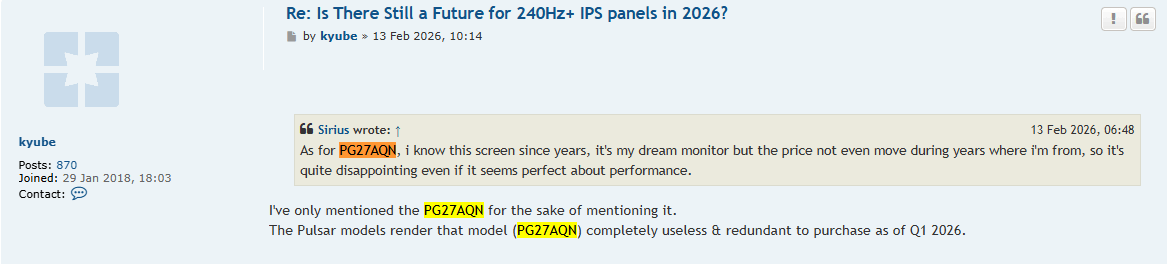
But wait, why did you say 2 months ago on one of my post that PG27AQN was "completely useless" when I said I was interested in this model while you here are recommending the PG27AQN?
I don't understand.
-
kyube

- Posts: 1016
- Joined: 29 Jan 2018, 12:03
Re: NVIDIA G-Sync Pulsar monitor - Asus ROG Strix XG27AQNGV
There were no reviews of the new QHD@360Hz models & their (fixed or variable refresh rate) strobing implementation(s) at that moment
evaluating xhci controller performance | audio latency discussion thread | "Why is LatencyMon not desirable to objectively measure DPC/ISR driver performance" | AM4 / AM5 system tuning considerations | latency-oriented HW considerations | “xhci hand-off” setting considerations | #1 tip for electricity-related topics | ESPORTS: Latency Perception, Temporal Ventriloquism & Horizon of Simultaneity | good lcd backlight strobing implementation list | display vs gpu scaling